FEATURES · INTERACTIVE WEBPAGES
Hosted Webpage Sharing in Gemini Notebook: fullscreen links, mobile QR codes & public showcase
What it does
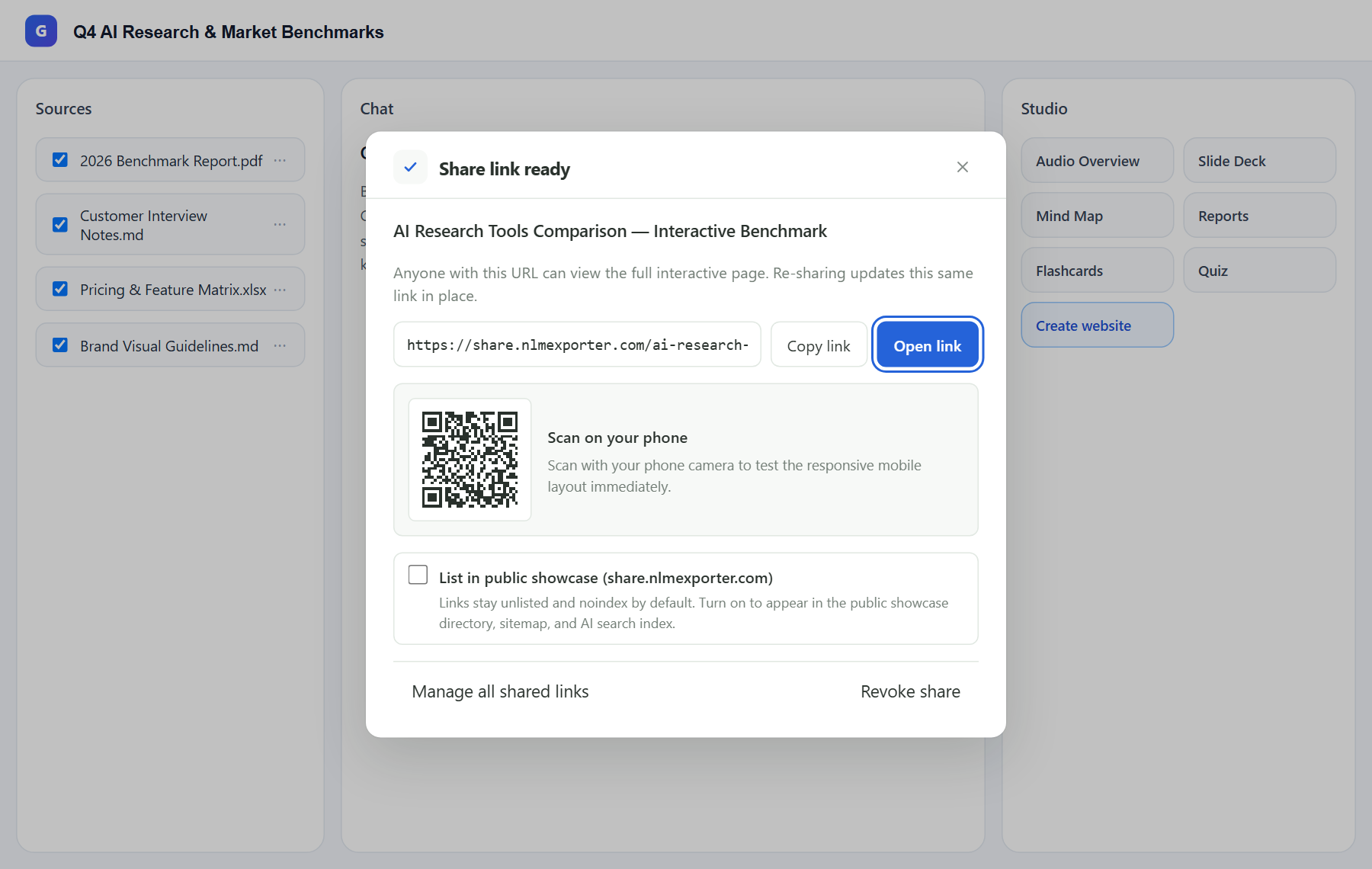
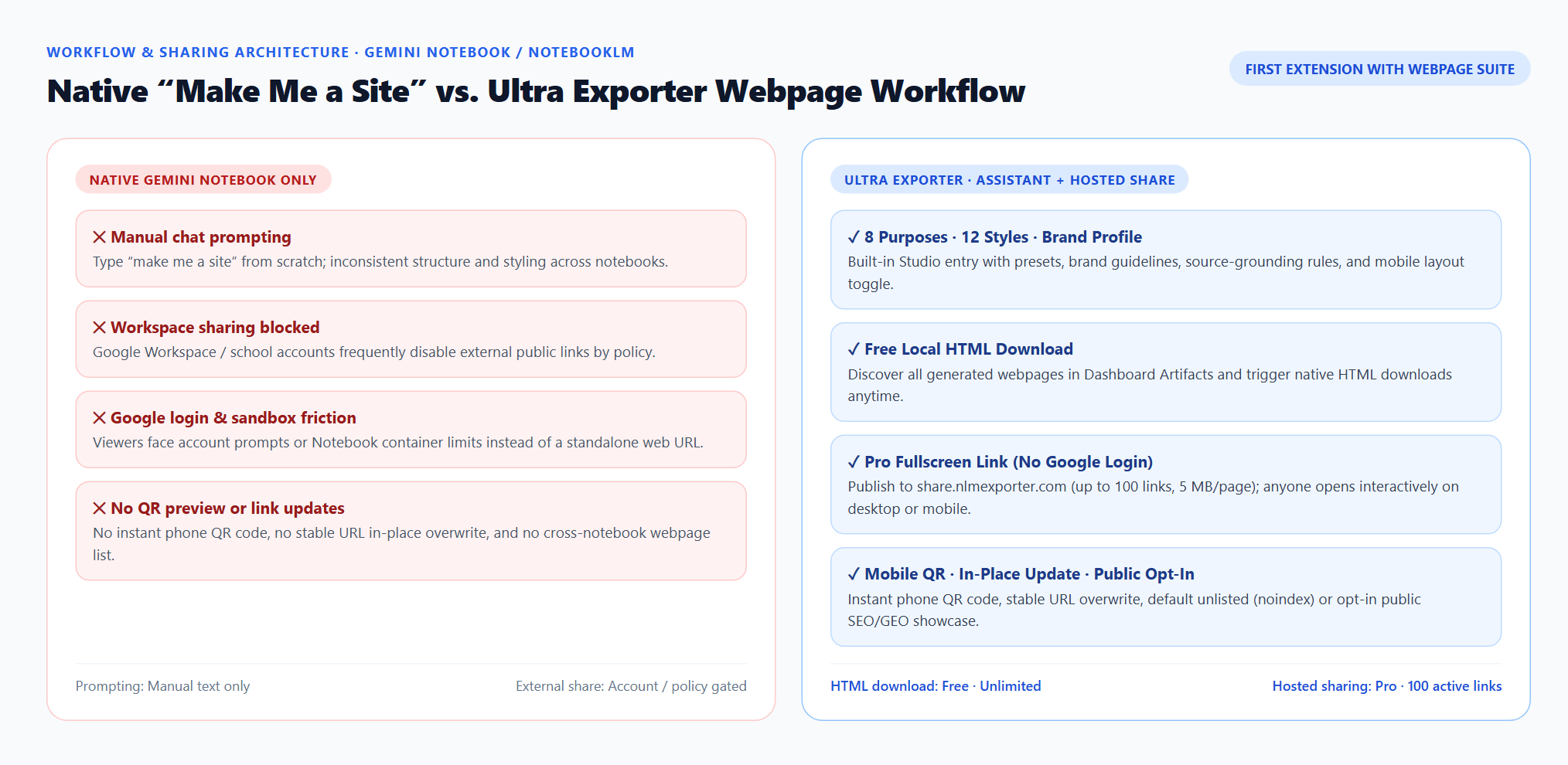
Hosted Webpage Sharing publishes any interactive webpage generated in Gemini Notebook / NotebookLM to a standalone fullscreen URL on share.nlmexporter.com. Recipients open the page on desktop or scan the instant QR code on their phone with zero Google sign-in, bypassing Google Workspace external-sharing blocks and Notebook sandbox limits.
Best suited for
Teams, consultants, teachers, and creators sharing NotebookLM interactive webpages with external readers or mobile users
Prerequisites
- A generated webpage artifact in Gemini Notebook Studio
- Ultra Exporter Pro connected to your account
Feature summary
| Item | Detail |
|---|---|
| Entry point | Studio webpage row menu (Create share link) and Dashboard → Studio Artifacts → Manage shared links |
| Plan | Pro |
| Free tier | Not included. Free users can download the standalone HTML file locally and self-host it anywhere. |
| Pro tier | Up to 100 active hosted links per account (5 MB max per HTML page), instant mobile QR codes, stable URL in-place updates, one-click revoke, and optional listing in the public showcase directory. |
How to use it
- Install NotebookLM Ultra Exporter in desktop Chrome, then refresh any open NotebookLM (Gemini Notebook) tab.
- Open Studio webpage row menu (Create share link) and Dashboard → Studio Artifacts → Manage shared links.
- Test on a single item first before running across a large batch.
What it does
- Publishes standalone interactive HTML to share.nlmexporter.com so anyone can use charts, filters, and responsive mobile layouts without a Google account.
- Generates a scannable QR code immediately so you can preview or share on phones and messaging apps.
- Keeps the same URL when you re-share an updated version of the same Studio webpage artifact.
- Defaults to unlisted (noindex, nofollow) for privacy, with an explicit opt-in toggle to publish into the public showcase directory with canonical, Open Graph, Schema.org WebPage JSON-LD, sitemap, and llms.txt discovery.
Limits to know
- Requires Ultra Exporter Pro and a connected website account; up to 100 active links and 5 MB per HTML document.
- Hosted HTML is uploaded to share.nlmexporter.com only when you explicitly click Create share link; revoking deletes the hosted file from the server.
- Follow your organization’s confidentiality rules before publishing internal Workspace documents externally.
Free vs Pro
Requires Ultra Exporter Pro (annual or one-time). Pro covers the extension only; it does not include a Google subscription or raise NotebookLM / Gemini Notebook's own limits. Current prices are on the pricing page.
Feature FAQ
Do I need Pro for Hosted Webpage Sharing in NotebookLM or Gemini Notebook?
Yes. Up to 100 active hosted links per account (5 MB max per HTML page), instant mobile QR codes, stable URL in-place updates, one-click revoke, and optional listing in the public showcase directory. Free: Not included. Free users can download the standalone HTML file locally and self-host it anywhere.
Are hosted NotebookLM webpages private or indexed by Google?
Private (unlisted and marked noindex, nofollow) by default so only people with the URL can open them. Only pages where you explicitly enable “List in public showcase (share.nlmexporter.com)” are indexed for search and AI discovery.
Verified sources & external references
- Create interactive websites in Gemini Notebook — Google Helpofficial
Documents Gemini Notebook interactive site generation ("make me a site"), native More → Download HTML flow, and native sharing constraints.
- NotebookLM Help Center — Google Supportofficial
Native Google Docs/Sheets exports, Studio outputs, and 50 free / up to 600 paid source caps.
Complete workflow guide
How to Create & Share Interactive Webpages from NotebookLM / Gemini Notebook (No Google Login)
Turn Gemini Notebook / NotebookLM sources into branded interactive webpages with 8 purposes, 12 styles, free HTML downloads, and Pro hosted links with mobile QR codes.
Related guides
Ultra Exporter is the first NotebookLM Chrome extension with an in-page Webpage Creation Assistant inside Studio.
Export NotebookLM generated webpages to HTML & manage in Dashboard. You get the standalone interactive HTML document generated by Gemini Notebook, ready for.
Native Gemini Notebook site sharing can be blocked by Google Workspace external-sharing policies or require viewers to sign in to a Google account inside the.
Gemini Notebook natively generates interactive sites when you type “make me a site” in chat, and some users still copy notes into Gemini Canvas and deploy.
NotebookLM Ultra Exporter adds an Export control beside notes, reports, chats and every Studio item, and in the Studio list.
Batch export lets you tick several notes, reports or Studio items in a NotebookLM notebook and export them together in one format instead of opening each.
Merged export combines several NotebookLM notes and reports into one Word, PDF or Markdown document.
Chat export saves a NotebookLM conversation, with its cited sources, as Markdown, Word, PDF, HTML, text, JSON or LaTeX.