COMPARE · APPROACHES
Native Gemini Notebook “make me a site” vs. Ultra Exporter Webpage Suite
Direct recommendation
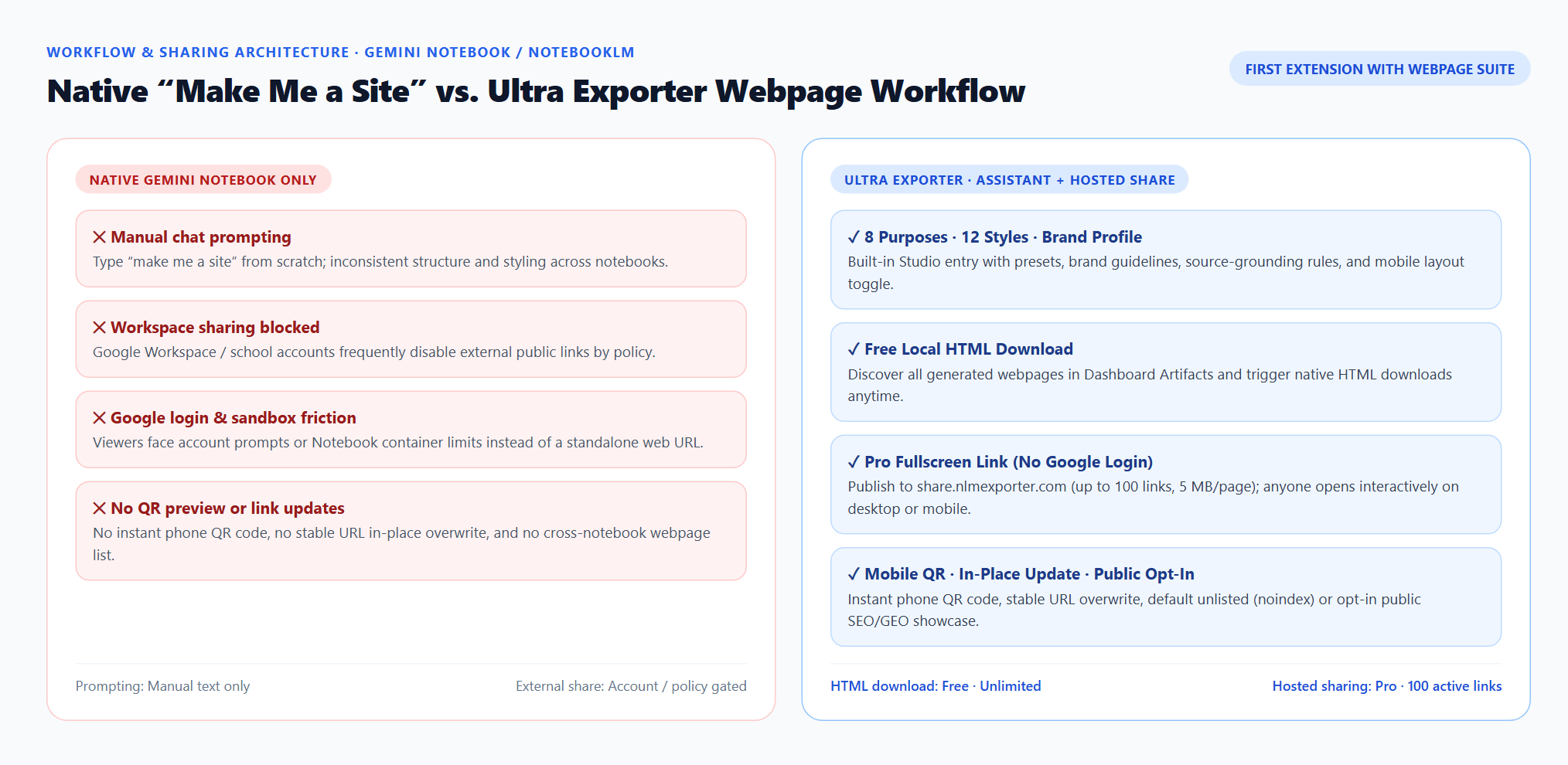
Gemini Notebook natively generates interactive sites when you type “make me a site” in chat, and some users still copy notes into Gemini Canvas and deploy manually to Netlify Drop. Ultra Exporter is the first NotebookLM extension that upgrades the entire workflow inside Studio: 8 structured purposes, 12 design styles, reusable brand guidelines, strict evidence rules, free Dashboard HTML downloads, and one-click Pro fullscreen hosting with mobile QR codes.
Best suited for
NotebookLM and Gemini Notebook users deciding between freehand “make me a site” prompts (or manual Gemini Canvas + Netlify Drop) and Ultra Exporter’s integrated webpage suite
Prerequisites
- Gemini Notebook / NotebookLM account with interactive site generation available
- Desktop Chrome with Ultra Exporter installed
Native Gemini Notebook / manual Gemini Canvas vs Ultra Exporter Webpage Assistant + Hosted Sharing: side by side
| Dimension | Native Gemini Notebook / manual Gemini Canvas | Ultra Exporter Webpage Assistant + Hosted Sharing |
|---|---|---|
| Prompt structure & quality | Freehand chat text (“make me a site”); quality varies each run | 8 structured purposes (4 Free / 4 Pro) + 12 design styles + one-click examples |
| Brand consistency | Must re-paste colors, fonts, and tone every time | Reusable local brand instructions + pick a checked notebook source as brand guide |
| Source grounding & missing data | Depends entirely on your manual prompt wording | Built-in evidence rules: facts vs assumptions, missing data vs zero, inline source titles/URLs |
| Cross-notebook management & HTML | Must open each notebook Studio individually to download | Dashboard → Studio Artifacts discovers webpages across notebooks + free native HTML download |
| External sharing without Google login | Blocked on many Workspace domains; requires account/sandbox or manual Netlify upload | Pro publishes to share.nlmexporter.com in 1 click (no Google sign-in, 100 links, 5 MB/page) |
| Mobile preview & URL updates | No QR code; re-deploying manually often changes URLs | Instant phone QR code + in-place URL overwrite + default unlisted (noindex) or public showcase |
When to pick each option
- Choose Native Gemini Notebook / manual Gemini Canvas if you only build occasional personal pages inside a personal Gmail account and do not need reusable brand styles, mobile QR previews, or login-free external sharing.
- Choose Ultra Exporter Webpage Assistant + Hosted Sharing if you want consistent professional webpages straight from Studio—and need free local HTML management or one-click login-free sharing for clients, teams, or classrooms.
What about the manual NotebookLM → Gemini Canvas → Netlify Drop workaround?
- Copying notes from NotebookLM into Gemini Canvas and uploading HTML to Netlify Drop breaks direct source grounding and requires 4+ manual steps every time your sources change.
- Ultra Exporter keeps generation grounded in your checked Gemini Notebook sources, lets you download HTML locally for free if you still prefer Netlify/Vercel, or updates a hosted share.nlmexporter.com link in place with one click (Pro).
Plan comparison
The basics are free; the advanced options listed on this page need Ultra Exporter Pro. Pro covers the extension only; it does not include a Google subscription or raise NotebookLM / Gemini Notebook's own limits. Current prices are on the pricing page.
Comparison FAQ
Native Gemini Notebook / manual Gemini Canvas or Ultra Exporter Webpage Assistant + Hosted Sharing: which is better for NotebookLM / Gemini Notebook?
Neither in general. Choose Native Gemini Notebook / manual Gemini Canvas if you only build occasional personal pages inside a personal Gmail account and do not need reusable brand styles, mobile QR previews, or login-free external sharing. Choose Ultra Exporter Webpage Assistant + Hosted Sharing if you want consistent professional webpages straight from Studio—and need free local HTML management or one-click login-free sharing for clients, teams, or classrooms.
Does Ultra Exporter replace Gemini Notebook’s site generator with its own AI?
No. Gemini Notebook generates the actual webpage directly from your checked sources. Ultra Exporter structures the prompt, brand guidelines, and evidence rules before generation, then adds Dashboard management, free HTML export, and optional Pro hosted sharing afterward.
Do any other NotebookLM Chrome extensions include a webpage creation assistant and hosted sharing?
No major NotebookLM extension currently combines an in-page Studio Webpage Creation Assistant, reusable brand profiles, Dashboard webpage artifact downloads, and dedicated hosted sharing with mobile QR codes. Other extensions focus on web clipping or document exports.
Verified sources & external references
- Create interactive websites in Gemini Notebook — Google Helpofficial
Documents Gemini Notebook interactive site generation ("make me a site"), native More → Download HTML flow, and native sharing constraints.
- NotebookLM Help Center — Google Supportofficial
Native Google Docs/Sheets exports, Studio outputs, and 50 free / up to 600 paid source caps.
Complete workflow guide
How to Create & Share Interactive Webpages from NotebookLM / Gemini Notebook (No Google Login)
Turn Gemini Notebook / NotebookLM sources into branded interactive webpages with 8 purposes, 12 styles, free HTML downloads, and Pro hosted links with mobile QR codes.
Related guides
Ultra Exporter is the first NotebookLM Chrome extension with an in-page Webpage Creation Assistant inside Studio.
Hosted Webpage Sharing publishes any interactive webpage generated in Gemini Notebook / NotebookLM to a standalone fullscreen URL on share.nlmexporter.com.
Export NotebookLM generated webpages to HTML & manage in Dashboard. You get the standalone interactive HTML document generated by Gemini Notebook, ready for.
Native Gemini Notebook site sharing can be blocked by Google Workspace external-sharing policies or require viewers to sign in to a Google account inside the.
A ZIP archive is a one-off snapshot of a NotebookLM notebook in a single file; one full archive is free.
Batch export saves several NotebookLM notes and reports as separate files in one go, zipped together.
A link source asks NotebookLM to fetch a web page itself; it keeps the URL and works for public pages.
The built-in option sends one NotebookLM note or report to a new Google Doc in your Drive. A Word export creates a .docx file on your computer that opens in.