QUESTIONS · GEMINI NOTEBOOK
How do I share a NotebookLM / Gemini Notebook webpage without Google login or Workspace blocks?
Direct answer
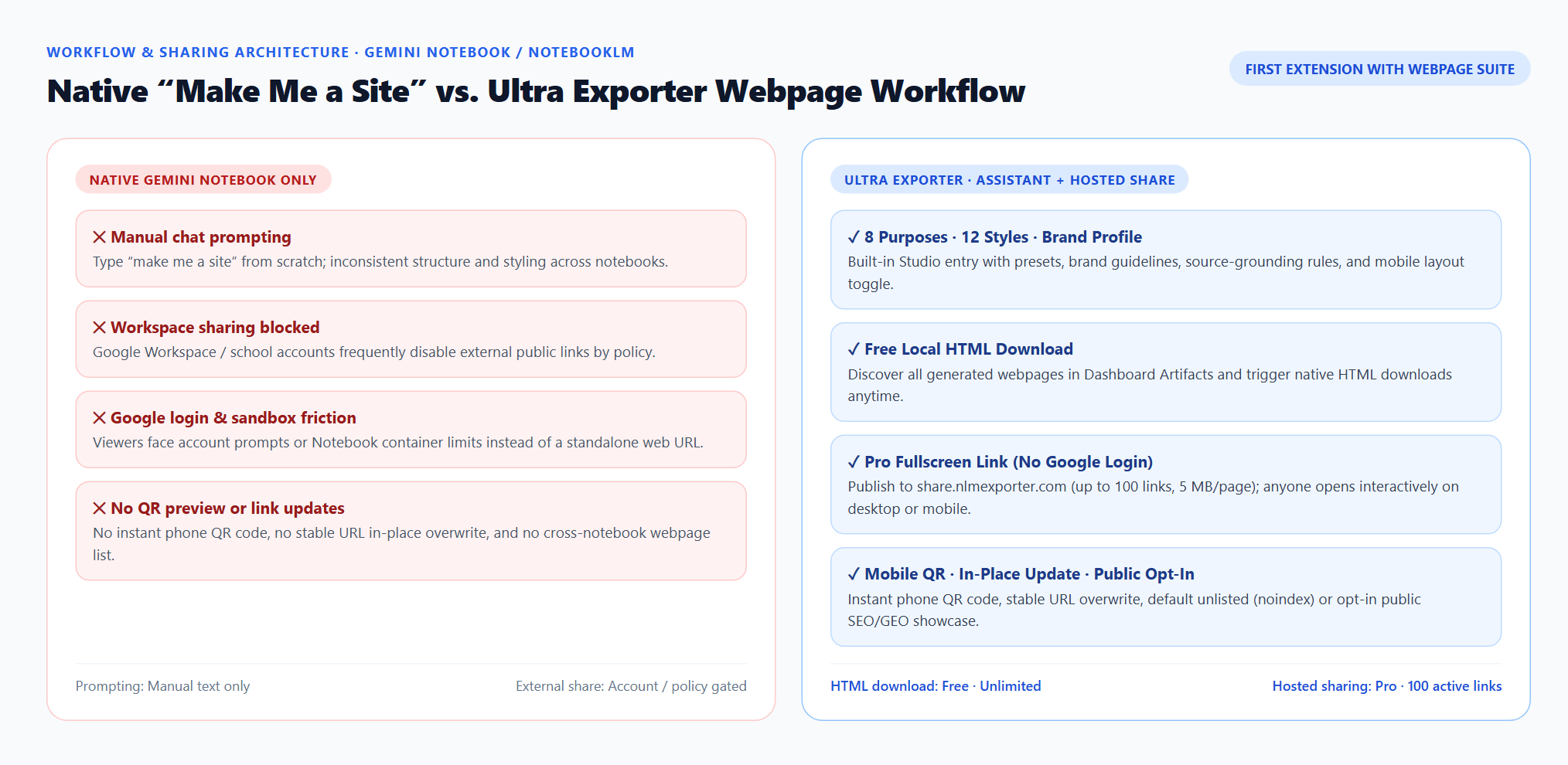
Native Gemini Notebook site sharing can be blocked by Google Workspace external-sharing policies or require viewers to sign in to a Google account inside the Notebook environment. With Ultra Exporter, you can either download the standalone HTML file for free and host it anywhere, or use Pro Hosted Webpage Sharing to publish a fullscreen share.nlmexporter.com URL with an instant mobile QR code and zero Google login required.
Best suited for
Google Workspace users, consultants, teachers, and creators sharing generated Gemini Notebook interactive sites with clients, students, or mobile readers
Prerequisites
- An interactive webpage generated in Gemini Notebook / NotebookLM Studio
- Desktop Chrome with NotebookLM Ultra Exporter installed (HTML download is free; one-click share.nlmexporter.com hosting requires Pro)
What to do
- Install NotebookLM Ultra Exporter in desktop Chrome, then refresh any open NotebookLM (Gemini Notebook) tab.
- Generate your interactive webpage in Gemini Notebook using Studio → Create website (Webpage Creation Assistant) and verify the citations and controls.
- For Free self-hosting, click Export HTML on the Studio webpage row (or in Dashboard → Studio Artifacts) and upload the
.htmlfile to any static host. - For Pro one-click hosting, click Create share link to publish to
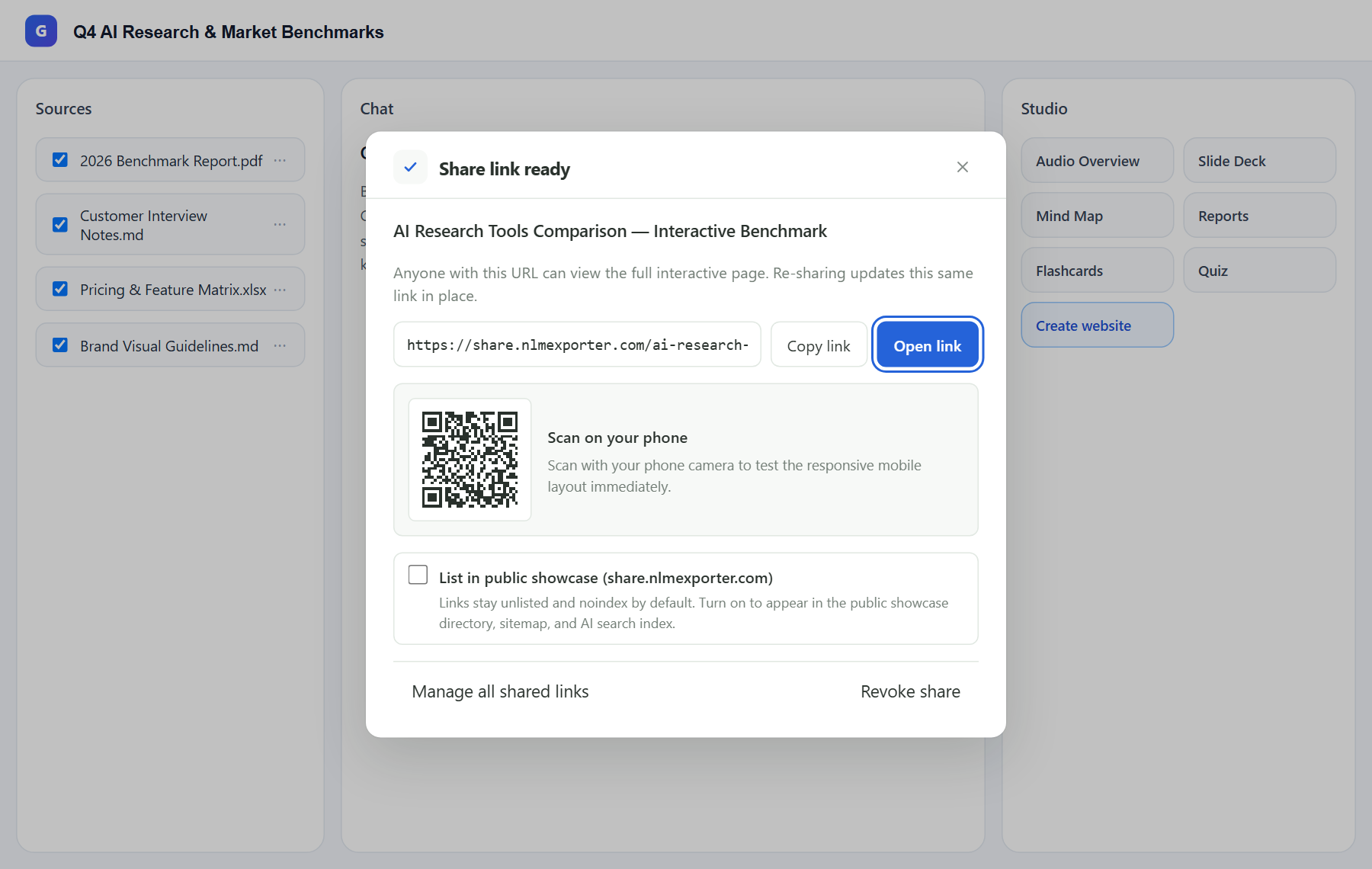
share.nlmexporter.com, copy the standalone URL or scan the mobile QR code, and keep it Unlisted (noindex) by default or opt in to the public showcase.
What to know
- Google Workspace and school domains frequently disable external public links, preventing clients or external reviewers from opening native Gemini Notebook sites.
- Even on personal Gmail accounts, native sharing keeps users tied to Google account prompts and isolates each viewer’s interactive inputs without providing a phone QR code.
- Free route: click Export HTML on the Studio webpage row or in Dashboard → Studio Artifacts to download the standalone HTML document and upload it to Netlify Drop, GitHub Pages, or Vercel.
- Pro route: click Create share link to publish directly to share.nlmexporter.com (up to 100 active links, 5 MB max per page) with fullscreen interactivity, scannable mobile QR code, in-place URL updates, and one-click revoke.
Compliance & privacy check before sharing Workspace material
- Because share.nlmexporter.com serves the exported HTML outside your Google Workspace domain, anyone holding the URL can view the page until you revoke it.
- Keep client or internal drafts on the default Unlisted (noindex) setting, never publish confidential data to the public showcase, and follow your organization’s data-handling rules.
Google changes these menus often. The item's own menu in your notebook shows what is built in today.
Plan requirement
The basics are free; the advanced options listed on this page need Ultra Exporter Pro. Pro covers the extension only; it does not include a Google subscription or raise NotebookLM / Gemini Notebook's own limits. Current prices are on the pricing page.
Follow-up questions
Do recipients need a Google account or Chrome extension to view a share.nlmexporter.com link?
No. Recipients open the fullscreen interactive HTML directly in any desktop or mobile browser (including Safari, Chrome, Edge, or inside messaging apps) with no Google sign-in and no extension installed.
Can I update the webpage later without sending a new link?
Yes. Re-sharing the same Studio webpage artifact overwrites the hosted HTML in place while keeping the same share.nlmexporter.com URL and QR code.
Is downloading the webpage as HTML free if I want to host it myself?
Yes. Triggering native HTML export from Studio or Dashboard Artifacts is completely free with no daily extension quota.
How do I take a shared webpage offline later?
Click Revoke share in the share dialog or open Dashboard → Manage shared links to delete the link and remove the HTML object from the server immediately.
Verified sources & external references
- Create interactive websites in Gemini Notebook — Google Helpofficial
Documents Gemini Notebook interactive site generation ("make me a site"), native More → Download HTML flow, and native sharing constraints.
- NotebookLM Help Center & Source Limits — Google Supportofficial
Covers 50 free / up to 600 paid source limits, 500k words / 200 MB per source, and flat notebook homepage behavior.
Complete workflow guide
How to Create & Share Interactive Webpages from NotebookLM / Gemini Notebook (No Google Login)
Turn Gemini Notebook / NotebookLM sources into branded interactive webpages with 8 purposes, 12 styles, free HTML downloads, and Pro hosted links with mobile QR codes.
Related guides
Hosted Webpage Sharing publishes any interactive webpage generated in Gemini Notebook / NotebookLM to a standalone fullscreen URL on share.nlmexporter.com.
Ultra Exporter is the first NotebookLM Chrome extension with an in-page Webpage Creation Assistant inside Studio.
Export NotebookLM generated webpages to HTML & manage in Dashboard. You get the standalone interactive HTML document generated by Gemini Notebook, ready for.
Gemini Notebook natively generates interactive sites when you type “make me a site” in chat, and some users still copy notes into Gemini Canvas and deploy.
Yes. Google renamed NotebookLM to Gemini Notebook on July 16, 2026. It is the same product: your notebooks, sources and Studio outputs carried over, and many.
Yes. NotebookLM Ultra Exporter runs on the notebook pages under their new Gemini Notebook name. Version 1.2.16 was checked against it in November 2026.
On its own, Gemini Notebook (NotebookLM) sends notes and reports to Google Docs and data tables to Google Sheets, and downloads slide decks as PDF or image.
Partly. NotebookLM (Gemini Notebook) can send notes and reports to Google Docs, data tables to Google Sheets, and download slides, flashcards, infographics.