EXPORT · INTERACTIVE WEBPAGES
Export NotebookLM generated webpages to HTML & manage in Dashboard
Export summary
Yes. To download an interactive webpage generated in Gemini Notebook / NotebookLM as standalone HTML, click Export HTML on the Studio webpage row or open Dashboard → Studio Artifacts to find, preview, and download webpages across notebooks for free. It is free in NotebookLM Ultra Exporter, with no daily quota and no account. You get the standalone interactive HTML document generated by Gemini Notebook, ready for offline browser review, archiving, or self-hosting.
Best suited for
Creators, analysts, and teachers downloading interactive Gemini Notebook sites for offline archiving or self-hosting
Prerequisites
- A generated interactive webpage inside Gemini Notebook / NotebookLM Studio
- Desktop Chrome with Ultra Exporter installed
Format & plan details
| Item | Detail |
|---|---|
| Source material | Generated webpages are interactive HTML mini-sites created in Gemini Notebook / NotebookLM from your selected sources. |
| Output format | standalone HTML (.html) |
| Plan | Free |
| Entry point | Export HTML button on the Studio webpage row, or Dashboard → Studio Artifacts |
| Privacy | Converted locally in your browser; documents are not uploaded. |
How to export
- Open the notebook in NotebookLM / Gemini Notebook (with Ultra Exporter installed in Chrome).
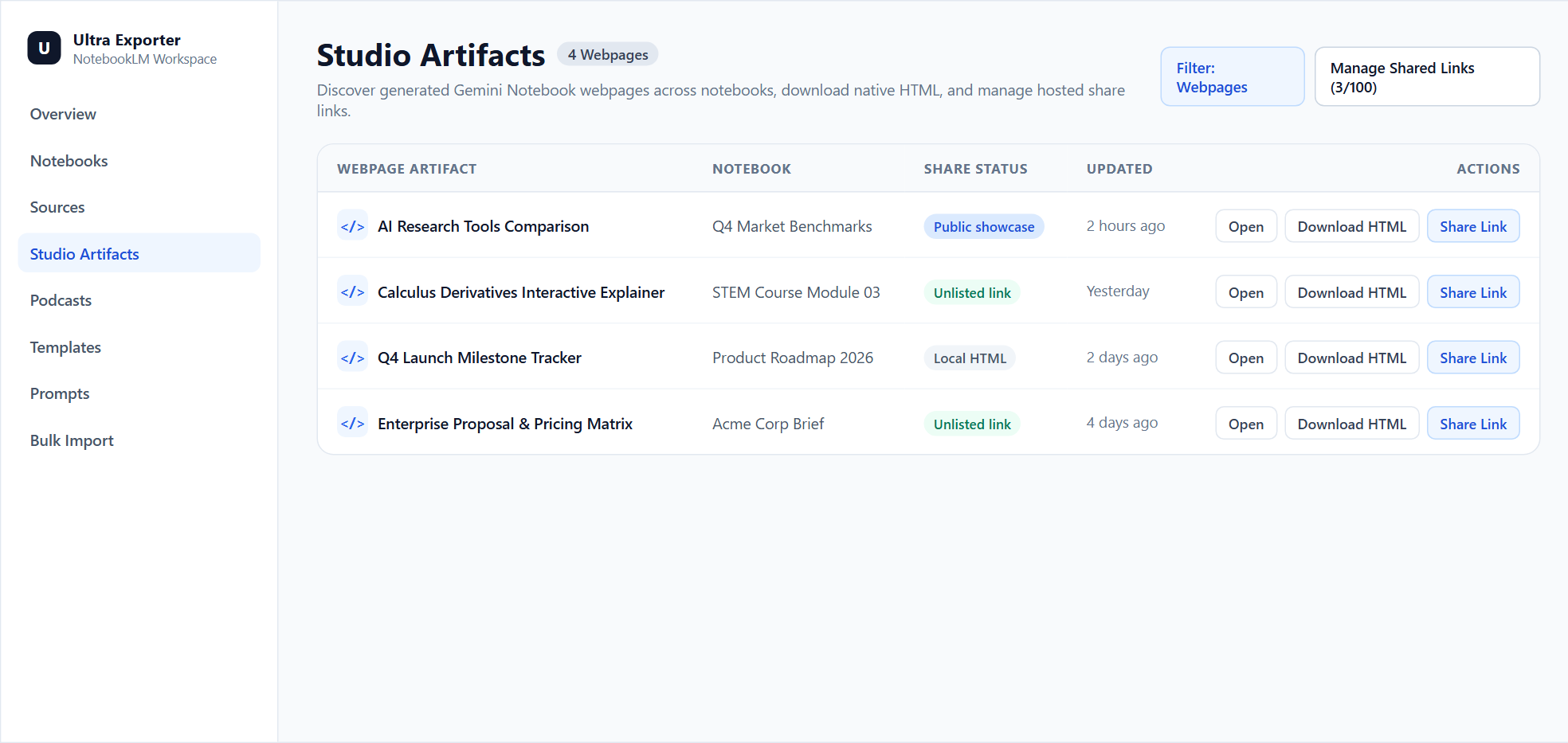
- Click Export HTML beside the webpage row in Studio, or open Dashboard → Studio Artifacts and filter by Webpages to view, download, or manage shares across notebooks.
- Select standalone HTML and adjust any export options (such as citations, layout, or scope).
- Open the downloaded file and check it before you rely on it or share it.
What the downloaded webpage HTML contains
You get the standalone interactive HTML document generated by Gemini Notebook, ready for offline browser review, archiving, or self-hosting.
Want a fullscreen URL with a mobile QR code and no Google sign-in without deploying HTML manually? Use Hosted Webpage Sharing (Pro).
Native download handoff & sharing boundaries
- Ultra Exporter triggers Gemini Notebook’s native HTML download cleanly rather than scraping an iframe or executing page scripts.
- Generated webpages are downloaded individually rather than bundled into generic document batch conversions.
- To share a webpage without requiring Google sign-in or self-hosting the HTML file, use Pro Hosted Webpage Sharing.
Native Studio download vs Dashboard & hosted sharing
Google Gemini Notebook supports downloading individual sites through each item’s More → Download menu inside its own notebook, with no cross-notebook webpage hub or one-click external hosting. Google changes these menus often. The item's own menu in your notebook shows what is built in today.
Free vs Pro limits
Free, with no daily export quota and no website account needed. Pro covers the extension only; it does not include a Google subscription or raise NotebookLM / Gemini Notebook's own limits. Current prices are on the pricing page.
Common export questions
Is standalone HTML export free for NotebookLM generated webpages?
Yes. It is a basic format with no daily export quota, no account and no payment card. Free batches are limited to 5 items.
Why does Ultra Exporter use Gemini Notebook’s native HTML download instead of scraping the preview iframe?
Triggering the native More → Download handoff preserves the exact complete HTML artifact Google generated without executing untrusted page scripts or losing embedded interactive controls.
Is downloading a NotebookLM generated webpage as HTML free?
Yes. Triggering native HTML download from Studio or Dashboard Artifacts is free without a daily extension quota.
Can I discover and download generated webpages across notebooks?
Webpages download individually via native HTML export. Use Dashboard → Studio Artifacts to discover, filter, preview, and download generated webpages across open notebooks.
Verified sources & external references
- Create interactive websites in Gemini Notebook — Google Helpofficial
Documents Gemini Notebook interactive site generation ("make me a site"), native More → Download HTML flow, and native sharing constraints.
- NotebookLM Help Center — Google Supportofficial
Native Google Docs/Sheets exports, Studio outputs, and 50 free / up to 600 paid source caps.
Complete workflow guide
How to Create & Share Interactive Webpages from NotebookLM / Gemini Notebook (No Google Login)
Turn Gemini Notebook / NotebookLM sources into branded interactive webpages with 8 purposes, 12 styles, free HTML downloads, and Pro hosted links with mobile QR codes.
Related guides
Ultra Exporter is the first NotebookLM Chrome extension with an in-page Webpage Creation Assistant inside Studio.
Hosted Webpage Sharing publishes any interactive webpage generated in Gemini Notebook / NotebookLM to a standalone fullscreen URL on share.nlmexporter.com.
Native Gemini Notebook site sharing can be blocked by Google Workspace external-sharing policies or require viewers to sign in to a Google account inside the.
Cite NotebookLM sources in APA style. You get a reference list in APA style built from each selected source's title, link and access date.
Cite NotebookLM sources in MLA style. You get a works-cited list in MLA style built from the selected sources' metadata.
Cite NotebookLM sources in Chicago style. You get a Chicago-style bibliography for the selected sources.
Export NotebookLM sources to BibTeX. You get BibTeX entries for the selected sources, to copy on Free or download as a .bib file with Pro.
Export NotebookLM sources to RIS. You get RIS records for the selected sources, the exchange format EndNote, Mendeley and Zotero import.