QUESTIONS · EXPORTING
How do I fix Invalid Moodle XML errors from NotebookLM quizzes?
Direct answer
Moodle throws "Invalid xml file — string expected (use CDATA?)" when hand-edited scripts or unescaped exports leave raw <, >, &, or HTML tags inside <text> nodes. Export directly with Ultra Exporter’s free Moodle XML option, which automatically wraps question stems, answer feedback, and hints inside <![CDATA[...]]>.
Best suited for
Moodle instructors seeing "Invalid xml file - string expected (use CDATA?)" or broken math symbols when importing quizzes
Prerequisites
- A NotebookLM Quiz open inside Studio
- Moodle course Question Bank -> Import access
What to do
- Install NotebookLM Ultra Exporter in desktop Chrome, then refresh any open NotebookLM (Gemini Notebook) tab.
- Open the generated Quiz inside NotebookLM Studio.
- In Ultra Exporter’s Quiz dialog, choose Moodle XML (recommended for math/formatting) or Moodle GIFT — both are free.
- Upload the downloaded
.xmldirectly into Moodle Question bank -> Import -> Moodle XML format without modifying tags in Word or Notepad. - Check the imported preview questions for
</&clarity and MathJax\(...\)rendering.
What to know
- Inequalities in science/math quizzes (
[ATP] < 1 mM,x > 0,NAD+ & NADH) break raw XML parsers unless CDATA-wrapped. - Re-saving an XML file in Windows Notepad under non-UTF-8 encoding can also trigger Moodle character parse failures.
- GIFT (.txt) or Moodle XML via Ultra Exporter are both 100% free with zero daily quota.
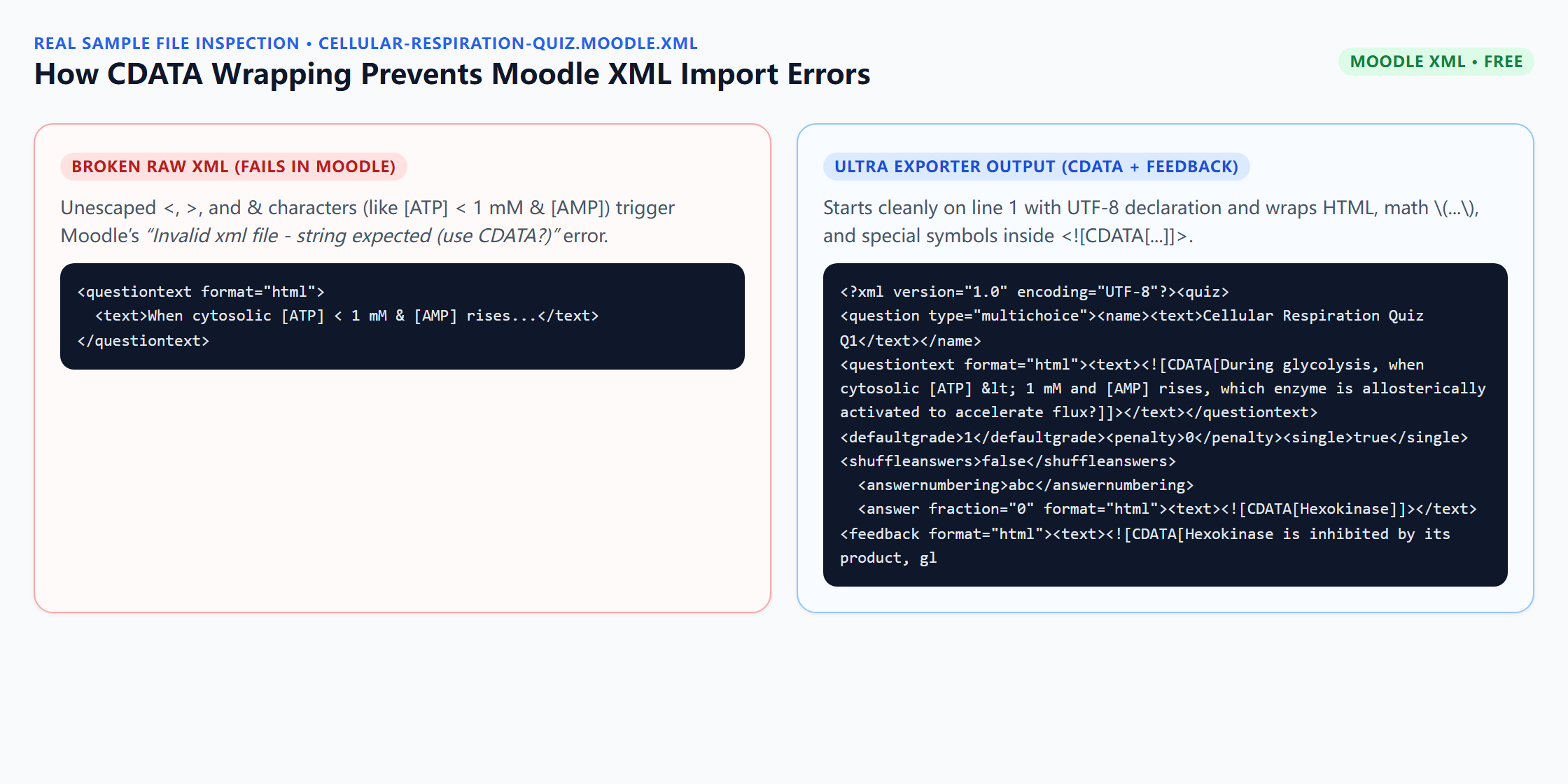
<![CDATA[...]]> and escapes math delimiters automatically.Downloadable verified test files
Google changes these menus often. The item's own menu in your notebook shows what is built in today.
Plan requirement
Free, with no daily export quota and no website account needed. Pro covers the extension only; it does not include a Google subscription or raise NotebookLM / Gemini Notebook's own limits. Current prices are on the pricing page.
Follow-up questions
Do equations in Moodle XML work after import?
Yes — Ultra Exporter converts $...$ and $$...$$ into standard Moodle TeX/MathJax delimiters (\(...\) and \[...\]) inside CDATA blocks.
Should I choose Moodle XML or GIFT if my questions have lots of math?
Choose Moodle XML first so CDATA isolates formatting cleanly; use GIFT when you prefer quick plain-text bulk editing.
Are multi-answer questions supported in Moodle XML?
Yes. Ultra Exporter computes fractional weights cleanly (100 / correctCount) for multi-select questions, whereas Aiken only accepts single-answer questions.
Why did Canvas reject my Moodle XML file?
Canvas requires QTI 1.2 .qti.zip, not Moodle XML. Pick Canvas QTI for Canvas LMS.
Verified sources & external references
- Moodle XML format — MoodleDocsplatform
Specifies UTF-8 encoding and CDATA escaping for HTML/code inside questions.
Complete workflow guide
How to Export NotebookLM Quizzes to Moodle XML, Canvas QTI 1.2, Google Forms, Kahoot & PDF
NotebookLM has no native quiz download button. Export single quizzes free in 19 formats—including Moodle XML, GIFT, Aiken, Canvas QTI 1.2 ZIP, Kahoot, Google Forms, Word & PDF—or build Teaching Packs with Pro.
Related guides
Yes. NotebookLM Ultra Exporter exports a NotebookLM quiz as Moodle GIFT, Moodle XML or Aiken for free.
Both import a NotebookLM quiz into the Moodle question bank, and both are free exports. GIFT is a compact text format you can read and fix by hand.
Use Moodle XML (or Moodle GIFT) for Moodle Question Banks, and Canvas QTI 1.2 ZIP for Canvas Classic Quizzes, Canvas New Quizzes, Blackboard, and.
NotebookLM quizzes run only in the browser and have no export. With NotebookLM Ultra Exporter, open the quiz, click Export and choose a target: Word or PDF.
NotebookLM only exports one note at a time to Google Docs and cannot merge multiple notes into one document.
Copying equations from NotebookLM with Ctrl+C pastes duplicate hidden KaTeX accessibility text and strips inline citation chips.
Google’s native mind map download saves one flat bitmap PNG of expanded branches, which blurs or shrinks to unreadable text on standard paper.
NotebookLM runs quizzes interactively in the browser with no print or worksheet download. With NotebookLM Ultra Exporter, open the quiz and export a free.