QUESTIONS · EXPORTING
How do I preserve math equations when exporting NotebookLM to Word?
Direct answer
Copying equations from NotebookLM with Ctrl+C pastes duplicate hidden KaTeX accessibility text and strips inline citation chips. Exporting with NotebookLM Ultra Exporter parses the underlying TeX expressions cleanly: Word (.docx) and PDF preserve readable math alongside footnotes (5 free/day), while LaTeX (.tex) and Markdown keep raw $...$ syntax free without limit.
Best suited for
STEM students, physics/economics researchers, and engineers moving NotebookLM derivations and formulas into Microsoft Word or LaTeX without garbled copy-paste
Prerequisites
- NotebookLM note, report, or chat containing rendered math equations (KaTeX)
- Microsoft Word, Google Docs, or Overleaf installed
What to do
- Install NotebookLM Ultra Exporter in desktop Chrome, then refresh any open NotebookLM (Gemini Notebook) tab.
- Open the note, report, or chat containing equations inside NotebookLM.
- Click Export and choose Word (.docx) for Microsoft Word/Google Docs editing, or LaTeX (.tex) / Markdown (.md) for Overleaf and Obsidian.
- Toggle Citations as footnotes if you want source references preserved next to formulas, then inspect complex multi-line matrices inside Word before submitting.
What to know
- Direct Ctrl+C copies both the visual KaTeX HTML and hidden MathML/annotation spans, creating doubled formulas like
A=P(1+rn)ntA = P(1+r/n)^{nt}in Word. - Ultra Exporter reads clean source math expressions directly before building
.docx,.pdf,.tex, or.mdfiles. - For journal manuscripts in Overleaf or LaTeX editors, free
.texexport preserves display and inline math delimiters cleanly.
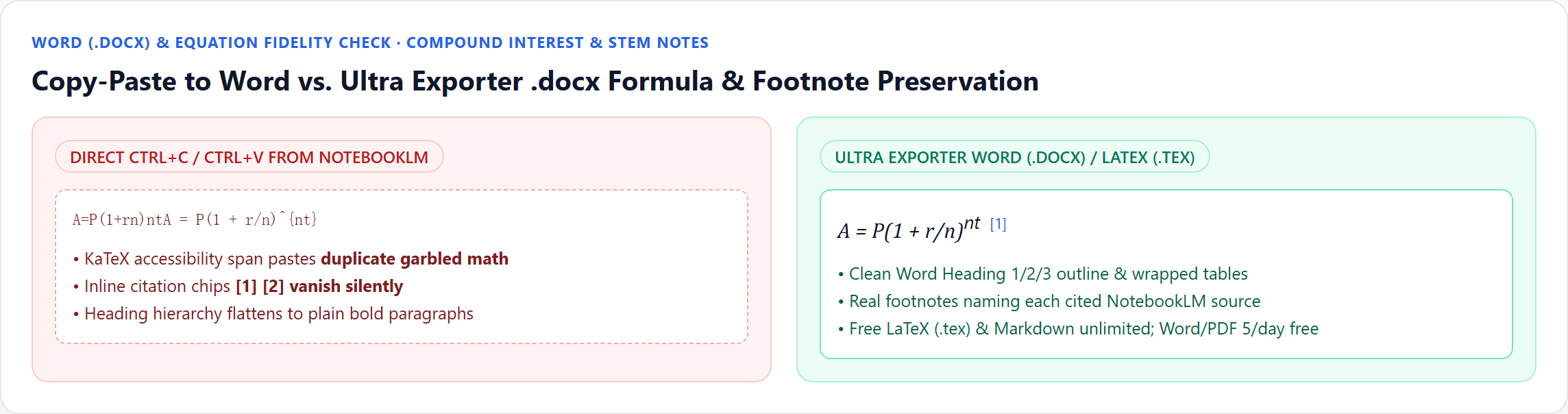
[1] citations; Ultra Exporter builds clean Word/LaTeX equations with footnotes.Downloadable verified test files
Complex display math verification tip
- Always spot-check multi-row piecewise matrices or rare custom LaTeX macros after opening in Word — if a journal requires strict TeX typesetting, export directly to free
.texfor Overleaf.
Google changes these menus often. The item's own menu in your notebook shows what is built in today.
Plan requirement
The basics are free; the advanced options listed on this page need Ultra Exporter Pro. Pro covers the extension only; it does not include a Google subscription or raise NotebookLM / Gemini Notebook's own limits. Current prices are on the pricing page.
Follow-up questions
Why does copying math from NotebookLM paste every formula twice in Word?
NotebookLM renders equations with KaTeX, which puts both screen-reader MathML and visual HTML spans in the DOM. Browser copy-paste grabs both layers; Ultra Exporter extracts clean TeX syntax once.
Is exporting equations to LaTeX (.tex) or Markdown free?
Yes — LaTeX (.tex) and Markdown (.md) exports for notes, reports, and chats are 100% free with no daily quota.
Do equations also survive when exporting flashcards to Anki?
Yes. Ultra Exporter converts $...$ and $$...$$ into Anki’s native MathJax delimiters (\(...\) and \[...\]) in both free TSV and Pro .apkg exports.
Will Word equations remain editable if I upload the .docx to Google Docs?
Google Docs imports standard .docx structure cleanly, though complex equations render best when edited in desktop Microsoft Word or Overleaf.
Verified sources & external references
- NotebookLM Help Center — Google Supportofficial
Native Google Docs/Sheets exports, Studio outputs, and source limits.
- Broken KaTeX math when copying from AI web apps to Word — r/notebooklm & KaTeX docsplatform
Explains why copying rendered KaTeX DOM nodes duplicates visual HTML and accessible MathML strings.
Complete workflow guide
How to Export NotebookLM Notes & Reports to Word (.docx) & PDF with Editable Equations & Tables
Stop broken `$...$` math and clipped print-to-PDF tables. Export NotebookLM / Gemini Notebook notes and reports locally to Word (.docx) with native OMML equations, clean PDF, or unlimited Markdown & LaTeX.
Related guides
How to Convert NotebookLM notes to Word. You get an editable .docx with real headings, lists and tables.
How to Convert NotebookLM notes to LaTeX. You get a .tex file with the note's structure and its equations as LaTeX source.
Yes. NotebookLM Ultra Exporter exports NotebookLM notes, reports, chats and tables to .docx with real headings, lists and tables, and converts supported.
Yes. NotebookLM Ultra Exporter exports NotebookLM notes, reports, chats and tables to LaTeX (.tex) for free, with equations kept as LaTeX math.
Google’s native mind map download saves one flat bitmap PNG of expanded branches, which blurs or shrinks to unreadable text on standard paper.
NotebookLM runs quizzes interactively in the browser with no print or worksheet download. With NotebookLM Ultra Exporter, open the quiz and export a free.
Partly. NotebookLM (Gemini Notebook) can send notes and reports to Google Docs, data tables to Google Sheets, and download slides, flashcards, infographics.
Open the note and use its menu to send it to Google Docs, which is the only built-in route.