QUESTIONS · EXPORTING
How do I turn a NotebookLM quiz into a printable classroom test and answer key?
Direct answer
NotebookLM runs quizzes interactively in the browser with no print or worksheet download. With NotebookLM Ultra Exporter, open the quiz and export a free Student PDF (with Name/Date header and answers hidden) plus a separate Teacher Answer Key PDF or editable Word (.docx) worksheet containing correct answers, hints, and rationales — all free with no daily limit.
Best suited for
K-12 teachers, professors, and tutors turning NotebookLM Studio quizzes into paper handouts with a separate grading key
Prerequisites
- Generated Quiz visible in NotebookLM Studio
- Ultra Exporter installed in desktop Chrome (Student PDF, Answer Key PDF, and Word `.docx` quiz exports are free with zero daily quota)
What to do
- Install NotebookLM Ultra Exporter in desktop Chrome, then refresh any open NotebookLM (Gemini Notebook) tab.
- Generate and open your quiz inside NotebookLM Studio, checking each question for factual accuracy.
- Click Export -> pick Student PDF (or Word with Answers turned off) for the classroom test sheet.
- Click Export a second time -> pick Answer Key PDF (with Answers + Explanations enabled) for your grading sheet.
- Optional (Pro): use Exam Versions when you need randomized question and choice order (Form A / Form B) to discourage peeking in exam halls.
What to know
- Student Paper mode hides correct answers and rationales and adds clean Name/Date headers for photocopying.
- Teacher Answer Key mode marks every verified correct option (
✓) and prints full explanations and hints for fast grading. - Exporting Word (.docx) lets you tweak question difficulty, add point values, or merge multiple unit quizzes before printing; Pro adds shuffled Version A/B/C exam packs.
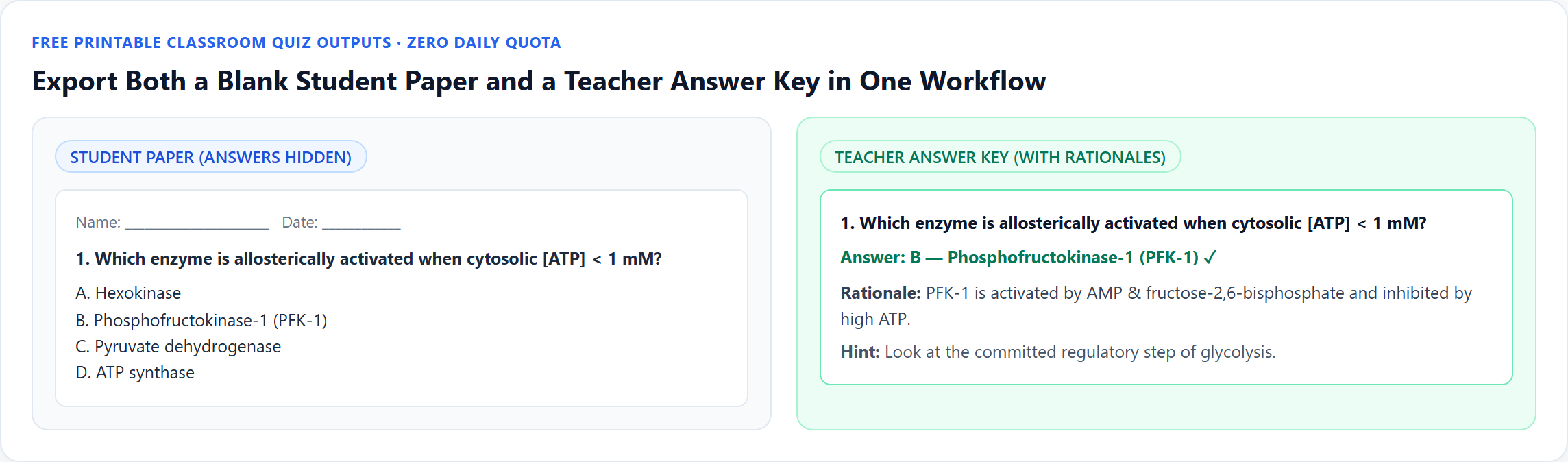
Downloadable verified test files
Real output from src/lib/quiz/formats.ts (`buildQuizWorksheetHtml`) with Name/Date header and answers hidden.
Matching grading sheet displaying ✓ markers, rationales, and hints for every question.
Google changes these menus often. The item's own menu in your notebook shows what is built in today.
Plan requirement
Free, with no daily export quota and no website account needed. Pro covers the extension only; it does not include a Google subscription or raise NotebookLM / Gemini Notebook's own limits. Current prices are on the pricing page.
Follow-up questions
Do Student PDF, Answer Key PDF, and Word quiz exports use the 5/day document quota?
No! All 19 standard single-quiz formats — including Student PDF, Answer Key PDF, Word (.docx), PowerPoint, Canvas QTI, Moodle XML/GIFT, and Google Forms — are free with zero daily quota.
Can I make Version A and Version B with shuffled options to prevent copying?
Yes — multi-version shuffled exam variants (with matching separate answer keys) and combined Teaching Packs are available in Ultra Exporter Pro.
Can I edit a weak distractor before printing the test for class?
Export as Word (.docx) first, edit the wording or add a grading rubric in Microsoft Word / Google Docs, then print.
Are math equations rendered cleanly on printed quiz papers?
Yes — Ultra Exporter renders KaTeX/MathML math cleanly so STEM symbols print sharply rather than turning into raw TeX.
Verified sources & external references
- NotebookLM Help Center — Google Supportofficial
Native Google Docs/Sheets exports, Studio outputs, and source limits.
Complete workflow guide
How to Export NotebookLM Quizzes to Moodle XML, Canvas QTI 1.2, Google Forms, Kahoot & PDF
NotebookLM has no native quiz download button. Export single quizzes free in 19 formats—including Moodle XML, GIFT, Aiken, Canvas QTI 1.2 ZIP, Kahoot, Google Forms, Word & PDF—or build Teaching Packs with Pro.
Related guides
How to Export NotebookLM quizzes to PDF. You get a printable quiz paper. The student sheet is for answering; the answer sheet contains the correct answers.
How to Convert NotebookLM quizzes to Word. You get the quiz as an editable .docx that you can reformat into a worksheet or exam paper.
Create exam versions and a teaching pack from a NotebookLM quiz. You get several versions of the same quiz and a teaching pack with student and answer.
NotebookLM quizzes run only in the browser and have no export. With NotebookLM Ultra Exporter, open the quiz, click Export and choose a target: Word or PDF.
Partly. NotebookLM (Gemini Notebook) can send notes and reports to Google Docs, data tables to Google Sheets, and download slides, flashcards, infographics.
Open the note and use its menu to send it to Google Docs, which is the only built-in route.
Not with NotebookLM itself. Gemini Notebook saves your chat history to the notebook but has no export or download for it; you can only copy a single reply or.
Open the slide deck in the Studio panel and use its download menu to save a PPTX; each slide in that file is one image.