COMPARE · STUDY FORMATS
QTI 1.2 vs QTI 2.1 for importing Gemini Notebook quizzes to Canvas
Direct recommendation
For Canvas and most university LMS platforms, QTI 1.2 is the most broadly compatible export target because both Canvas Classic Quizzes and Canvas New Quizzes ingest QTI 1.2 ZIP packages reliably. QTI 2.1 is newer XML but fails or drops item types in Classic Quizzes unless explicitly translated.
Best suited for
Instructors and instructional technologists deciding which QTI package version works reliably in Canvas Classic Quizzes, New Quizzes, and Blackboard
Prerequisites
- A NotebookLM quiz exported via Ultra Exporter (outputs QTI 1.2 `.qti.zip` free)
QTI 1.2 (.qti.zip) vs QTI 2.1: side by side
| Dimension | QTI 1.2 (.qti.zip) | QTI 2.1 |
|---|---|---|
| Canvas Classic Quizzes support | Native full support via Settings -> Import Course Content | Frequently rejected or partially parsed |
| Canvas New Quizzes support | Supported (Settings migration flag or Build -> Import Content) | Supported primarily for standard types |
| Moodle support | Better served by native Moodle XML or GIFT instead of QTI | Partial via plugins; Moodle XML is strongly preferred |
| Root package requirement | Must have imsmanifest.xml at exact ZIP root | Must have imsmanifest.xml at exact ZIP root |
| Ultra Exporter output | Generates spec-compliant QTI 1.2 ZIP for free | Use QTI 1.2 for universal Canvas reliability |
When to pick each option
- Choose QTI 1.2 (.qti.zip) if you want one quiz ZIP that imports cleanly across Canvas Classic Quizzes, New Quizzes, Blackboard, and Schoology.
- Choose QTI 2.1 if your enterprise assessment engine explicitly demands a QTI 2.1/3.0 schema outside standard Canvas LMS.
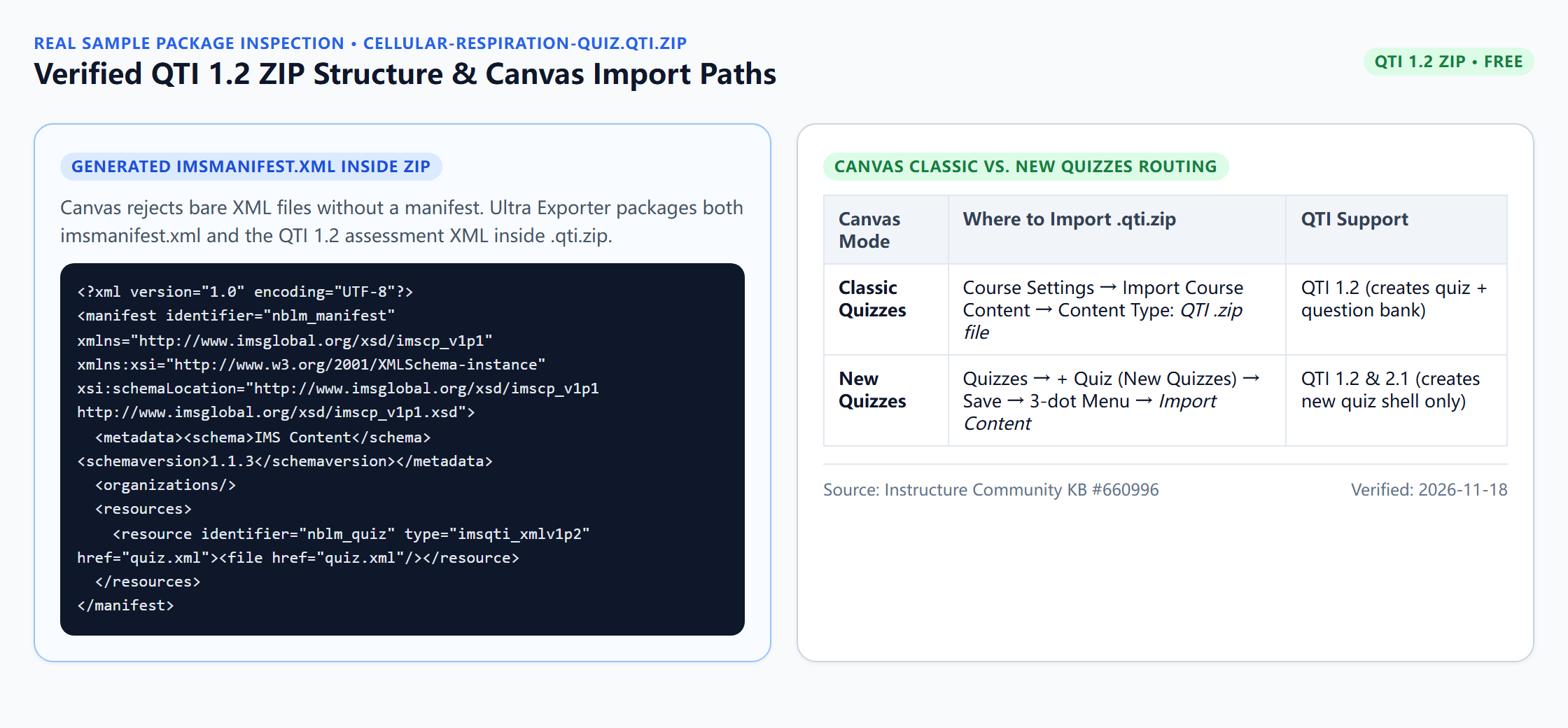
Downloadable verified test files
Plan comparison
Free, with no daily export quota and no website account needed. Pro covers the extension only; it does not include a Google subscription or raise NotebookLM / Gemini Notebook's own limits. Current prices are on the pricing page.
Comparison FAQ
QTI 1.2 (.qti.zip) or QTI 2.1: which is better for NotebookLM / Gemini Notebook?
Neither in general. Choose QTI 1.2 (.qti.zip) if you want one quiz ZIP that imports cleanly across Canvas Classic Quizzes, New Quizzes, Blackboard, and Schoology. Choose QTI 2.1 if your enterprise assessment engine explicitly demands a QTI 2.1/3.0 schema outside standard Canvas LMS.
Should I choose Canvas QTI 1.2 or Moodle XML if our school uses Moodle?
Always choose Moodle XML (or GIFT) for Moodle! Reserve QTI 1.2 ZIP specifically for Canvas, Blackboard, and Brightspace/D2L.
Why did my QTI ZIP fail in Canvas even though it is QTI 1.2?
Usually because macOS Finder or Windows Explorer wrapped files inside an extra subfolder when re-zipping. Upload Ultra Exporter’s .qti.zip directly without re-compressing it.
Verified sources & external references
- Instructure Canvas QTI Import Guide (KB #1046 & New Quizzes #660996)platform
Canvas documentation confirms QTI 1.2 works across Classic Quizzes and New Quizzes migrations.
Complete workflow guide
How to Export NotebookLM Quizzes to Moodle XML, Canvas QTI 1.2, Google Forms, Kahoot & PDF
NotebookLM has no native quiz download button. Export single quizzes free in 19 formats—including Moodle XML, GIFT, Aiken, Canvas QTI 1.2 ZIP, Kahoot, Google Forms, Word & PDF—or build Teaching Packs with Pro.
Related guides
Canvas rejects QTI uploads most often for three structural reasons: picking Common Cartridge instead of QTI .zip file in Course Import, unzipping and.
Yes. NotebookLM Ultra Exporter exports a NotebookLM quiz as a QTI 1.2 ZIP package for free.
NotebookLM quizzes run only in the browser and have no export. With NotebookLM Ultra Exporter, open the quiz, click Export and choose a target: Word or PDF.
Use Moodle XML (or Moodle GIFT) for Moodle Question Banks, and Canvas QTI 1.2 ZIP for Canvas Classic Quizzes, Canvas New Quizzes, Blackboard, and.
Choose Anki TSV (free) or .apkg (Pro) when you need multi-month spaced repetition and math equations; choose Quizlet text (free) when sharing quick web sets.
Single-purpose quiz clippers (such as NotebookLM Quiz Exporter) typically focus on dumping basic JSON, CSV, or raw text from quizzes, leaving educators to.
In 2026, Google’s built-in NotebookLM flashcard download exports raw CSV only, which frequently splits cards on commas, leaves Markdown bolding raw, breaks.
Both put NotebookLM flashcards into Anki. The tab-separated text file is free and imports through File, Import, where you confirm which column is the front.