COMPARE · STUDY FORMATS
NotebookLM Quiz Exporter vs Ultra Exporter for Canvas and Moodle
Direct recommendation
Single-purpose quiz clippers (such as NotebookLM Quiz Exporter) typically focus on dumping basic JSON, CSV, or raw text from quizzes, leaving educators to convert or fix broken XML manually. NotebookLM Ultra Exporter generates all 19 standard single-quiz formats — including root-manifest Canvas QTI 1.2 ZIP, CDATA-safe Moodle XML, GIFT, Aiken, Google Forms .gs, Kahoot, and Student/Answer Key PDFs — completely free with no daily limit.
Best suited for
Professors, K-12 teachers, and instructional designers choosing the most dependable Chrome extension for Canvas QTI 1.2, Moodle XML/GIFT, Google Forms, and printable exams
Prerequisites
- Desktop Chrome with access to NotebookLM Studio quizzes
- Canvas, Moodle, Google Forms, or printable classroom grading workflow
NotebookLM Ultra Exporter vs Single-purpose Quiz Exporters: side by side
| Dimension | NotebookLM Ultra Exporter | Single-purpose Quiz Exporters |
|---|---|---|
| Canvas LMS package | Free QTI 1.2 .qti.zip with valid root imsmanifest.xml | Often CSV/JSON only or lacks New Quizzes validation |
| Moodle Question Bank | Free CDATA-safe Moodle XML + GIFT + Aiken | Raw XML risks "Invalid xml file (use CDATA?)" errors |
| Google Forms creation | Free local .gs Apps Script (zero third-party Drive OAuth) | Typically requires CSV paste or paid add-on |
| Printable classroom papers | Free Student Paper PDF + separate Teacher Answer Key PDF + Word | Basic markdown or print screen |
| Math & STEM symbols | Preserves KaTeX/MathML & Moodle \(...\) delimiters | Often flattens formulas to raw text |
| Multi-version exams & packs | Pro adds shuffled Version A/B/C papers, Teaching Packs & .apkg | Not included in lightweight single-purpose scripts |
| Beyond quizzes | Also exports slides (editable PPTX), flashcards, mind maps, notes & backups | Quiz extraction only |
When to pick each option
- Choose NotebookLM Ultra Exporter if you teach in Canvas, Moodle, Google Forms, or paper classrooms and want validated LMS packages free without daily caps — plus slides, flashcards, and backups in one extension.
- Choose Single-purpose Quiz Exporters if you only need a minimal developer JSON dump for a custom internal script and have verified the current Chrome Web Store listing.
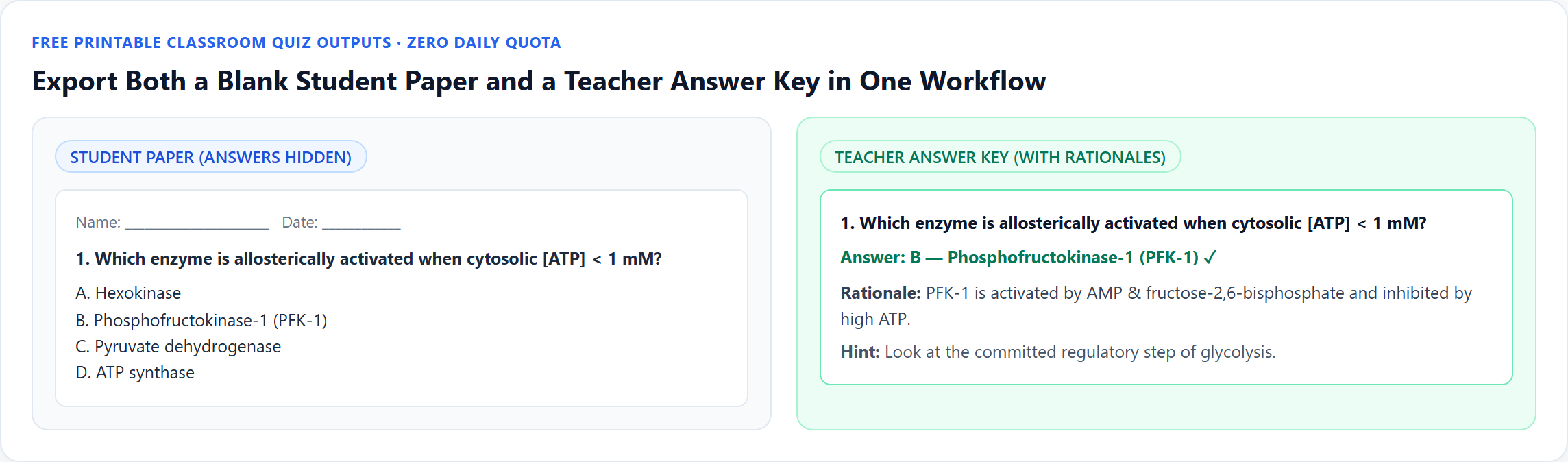
.gs, and dual Student/Teacher printouts for free.Downloadable verified test files
Import directly via Canvas Settings -> Import Course Content -> QTI .zip file.
CDATA-wrapped Moodle Question Bank XML file.
Run at script.google.com to create a graded Google Quiz Form.
Chrome Web Store verification reminder
- Third-party quiz extensions update their format lists and pricing frequently — check live Chrome Web Store listings before standardizing across a department.
Plan comparison
Free, with no daily export quota and no website account needed. Pro covers the extension only; it does not include a Google subscription or raise NotebookLM / Gemini Notebook's own limits. Current prices are on the pricing page.
Comparison FAQ
NotebookLM Ultra Exporter or Single-purpose Quiz Exporters: which is better for NotebookLM / Gemini Notebook?
Neither in general. Choose NotebookLM Ultra Exporter if you teach in Canvas, Moodle, Google Forms, or paper classrooms and want validated LMS packages free without daily caps — plus slides, flashcards, and backups in one extension. Choose Single-purpose Quiz Exporters if you only need a minimal developer JSON dump for a custom internal script and have verified the current Chrome Web Store listing.
Are Canvas QTI, Moodle XML, and Student/Answer Key PDFs really free with no daily limit in Ultra Exporter?
Yes — all 19 standard single-quiz formats have zero daily quota and require no website account.
Can I import both multiple-choice and multi-select questions into Moodle and Canvas?
Yes — Moodle XML and Canvas QTI preserve multi-answer scoring cleanly (Aiken is strictly single-choice by specification).
Verified sources & external references
- Canvas QTI 1.2 Import Documentation — Instructure Communityplatform
Official QTI 1.2 package requirements for Canvas LMS.
- Moodle XML Format & CDATA Spec — MoodleDocsplatform
Official Moodle XML escaping standards.
Complete workflow guide
How to Export NotebookLM Quizzes to Moodle XML, Canvas QTI 1.2, Google Forms, Kahoot & PDF
NotebookLM has no native quiz download button. Export single quizzes free in 19 formats—including Moodle XML, GIFT, Aiken, Canvas QTI 1.2 ZIP, Kahoot, Google Forms, Word & PDF—or build Teaching Packs with Pro.
Related guides
NotebookLM quizzes run only in the browser and have no export. With NotebookLM Ultra Exporter, open the quiz, click Export and choose a target: Word or PDF.
Use Moodle XML (or Moodle GIFT) for Moodle Question Banks, and Canvas QTI 1.2 ZIP for Canvas Classic Quizzes, Canvas New Quizzes, Blackboard, and.
Yes. NotebookLM Ultra Exporter exports a NotebookLM quiz as a QTI 1.2 ZIP package for free.
Yes. NotebookLM Ultra Exporter exports a NotebookLM quiz as Moodle GIFT, Moodle XML or Aiken for free.
In 2026, Google’s built-in NotebookLM flashcard download exports raw CSV only, which frequently splits cards on commas, leaves Markdown bolding raw, breaks.
Both put NotebookLM flashcards into Anki. The tab-separated text file is free and imports through File, Import, where you confirm which column is the front.
Both import a NotebookLM quiz into the Moodle question bank, and both are free exports. GIFT is a compact text format you can read and fix by hand.
NotebookLM flashcards can go to either for free. Anki is a spaced-repetition app that schedules each card for long-term memory and works offline.