COMPARE · STUDY FORMATS
Best ways to export NotebookLM flashcards to Anki in 2026
Direct recommendation
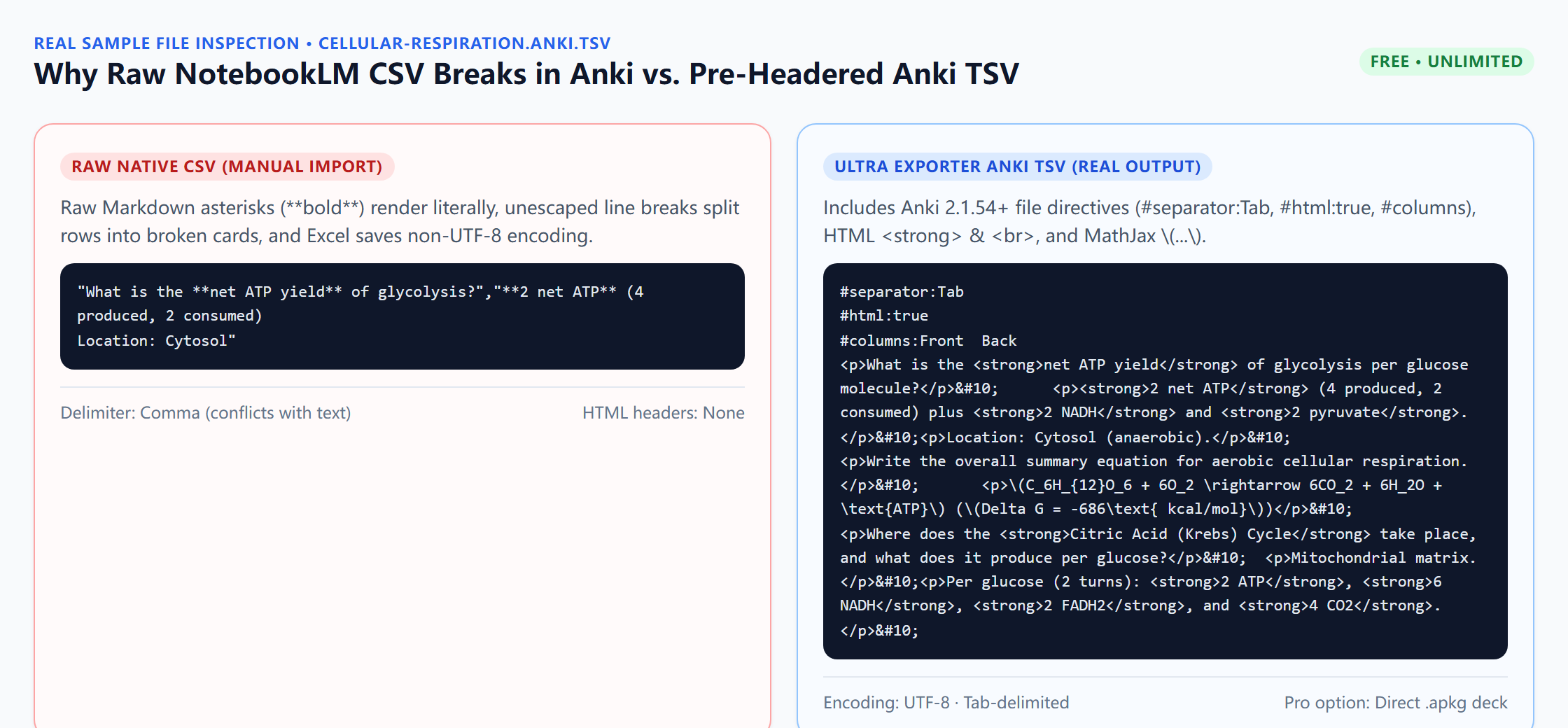
In 2026, Google’s built-in NotebookLM flashcard download exports raw CSV only, which frequently splits cards on commas, leaves Markdown bolding raw, breaks $...$ math, and corrupts UTF-8 characters when opened in Windows Excel. The cleanest free route is Ultra Exporter’s Anki TSV (with #separator:Tab, #html:true, and Anki MathJax), while Ultra Exporter Pro .apkg delivers one-click deck packaging with deck name, tags, and Source metadata.
Best suited for
Medical, law, STEM, and language learners comparing Google’s native CSV download, spreadsheet cleanup, community scripts, and Ultra Exporter Anki TSV / .apkg
Prerequisites
- Generated Flashcard deck inside NotebookLM Studio
- Anki Desktop 2.1.54+ / Anki 24+ (or AnkiMobile / AnkiDroid via AnkiWeb sync)
Native CSV / Manual Fixes vs Ultra Exporter (TSV Free / .apkg Pro): side by side
| Dimension | Native CSV / Manual Fixes | Ultra Exporter (TSV Free / .apkg Pro) |
|---|---|---|
| Cost & quota | Native CSV: free; manual cleanup takes 5–10 min/deck | Anki TSV: free unlimited; .apkg: Pro one-click package |
| Commas & multi-line backs | Splits into 3+ columns in Anki import dialog | Tab-separated (#separator:Tab) or binary SQLite .apkg |
| Markdown bold / code / HTML | Shows literal **asterisks** on study cards | Converted to clean HTML with #html:true header |
| LaTeX math formulas | Bare $x^2$ stays unrendered in Anki | Auto-converted to Anki MathJax \(x^2\) & \[...\] |
| UTF-8 accented / CJK text | Windows Excel re-save corrupts UTF-8 to ANSI | Clean UTF-8 output (no Excel middleman needed) |
| Deck name, tags & Source field | Manual setup every import | Packaged automatically in .apkg (Pro) |
When to pick each option
- Choose Native CSV / Manual Fixes if you have a tiny 10-card plain-English deck with no commas, math, or special symbols and prefer doing manual column mapping in LibreOffice Calc.
- Choose Ultra Exporter (TSV Free / .apkg Pro) if you study serious STEM, medical, law, or multilingual decks and want zero-error Anki TSV (free) or double-click
.apkgdecks (Pro) directly from Studio.
Plan comparison
The basics are free; the advanced options listed on this page need Ultra Exporter Pro. Pro covers the extension only; it does not include a Google subscription or raise NotebookLM / Gemini Notebook's own limits. Current prices are on the pricing page.
Comparison FAQ
Native CSV / Manual Fixes or Ultra Exporter (TSV Free / .apkg Pro): which is better for NotebookLM / Gemini Notebook?
Neither in general. Choose Native CSV / Manual Fixes if you have a tiny 10-card plain-English deck with no commas, math, or special symbols and prefer doing manual column mapping in LibreOffice Calc. Choose Ultra Exporter (TSV Free / .apkg Pro) if you study serious STEM, medical, law, or multilingual decks and want zero-error Anki TSV (free) or double-click .apkg decks (Pro) directly from Studio.
Should I use free Anki TSV or pay for Pro .apkg?
Start with free Anki TSV — it has no daily cap and keeps all HTML and MathJax formatting cleanly. Upgrade to Pro .apkg when you generate dozens of decks weekly and want double-click import with automatic deck names, tags, and Source fields.
Can I also export NotebookLM quizzes into Anki?
Yes — quizzes export as free Anki TSV or Pro .apkg decks with questions on the front and verified answers + rationales on the back.
Verified sources & external references
- Anki Manual — Importing Text Files & File Headersplatform
Official specification for #separator:Tab, #html:true, and UTF-8 text decks.
- Community reports on NotebookLM CSV import failures — r/Anki & r/notebooklmcommunity
Documents comma splitting, Excel encoding corruption, and single-purpose script workarounds.
Complete workflow guide
How to Export NotebookLM Flashcards to Anki (.apkg, TSV, Quizlet & Duplex PDF)
Export NotebookLM / Gemini Notebook flashcards to pre-headered Anki TSV, Quizlet, Markdown, HTML, XLSX, CSV or PDF free without daily limits—or build .apkg decks and duplex PDFs with Pro.
Related guides
NotebookLM downloads flashcards only as CSV, which Anki does not import cleanly. With NotebookLM Ultra Exporter, open the flashcard deck, click Export and.
NotebookLM’s native flashcard CSV omits Anki file headers, leaves Markdown asterisks and raw $...$ math unconverted, and breaks whenever card text contains.
Both put NotebookLM flashcards into Anki. The tab-separated text file is free and imports through File, Import, where you confirm which column is the front.
Yes, NotebookLM flashcards can go into Anki. NotebookLM Ultra Exporter exports a deck as Anki-importable tab-separated text for free, with no daily quota.
Both import a NotebookLM quiz into the Moodle question bank, and both are free exports. GIFT is a compact text format you can read and fix by hand.
NotebookLM flashcards can go to either for free. Anki is a spaced-repetition app that schedules each card for long-term memory and works offline.
For Canvas and most university LMS platforms, QTI 1.2 is the most broadly compatible export target because both Canvas Classic Quizzes and Canvas New Quizzes.
Use Moodle XML (or Moodle GIFT) for Moodle Question Banks, and Canvas QTI 1.2 ZIP for Canvas Classic Quizzes, Canvas New Quizzes, Blackboard, and.