COMPARE · APPROACHES
NotebookLM Ultra Exporter vs NotebookLM Tools: workflow comparison
Direct recommendation
Both extensions add workspace organisation and export tools on top of NotebookLM. NotebookLM Tools concentrates on mind-map exports, batch audio downloads, and folder/prompt helpers, while NotebookLM Ultra Exporter spans 19 free quiz/LMS targets (Canvas QTI, Moodle XML/GIFT), free Anki TSV and Pro .apkg decks, Pro editable PowerPoint rebuilds, whole-notebook Obsidian archives, and playlist/crawl imports.
Best suited for
Power users comparing NotebookLM Ultra Exporter and NotebookLM Tools for mind maps, audio batching, LMS quizzes, and folders
Prerequisites
- Desktop Chrome with access to https://notebooklm.google.com
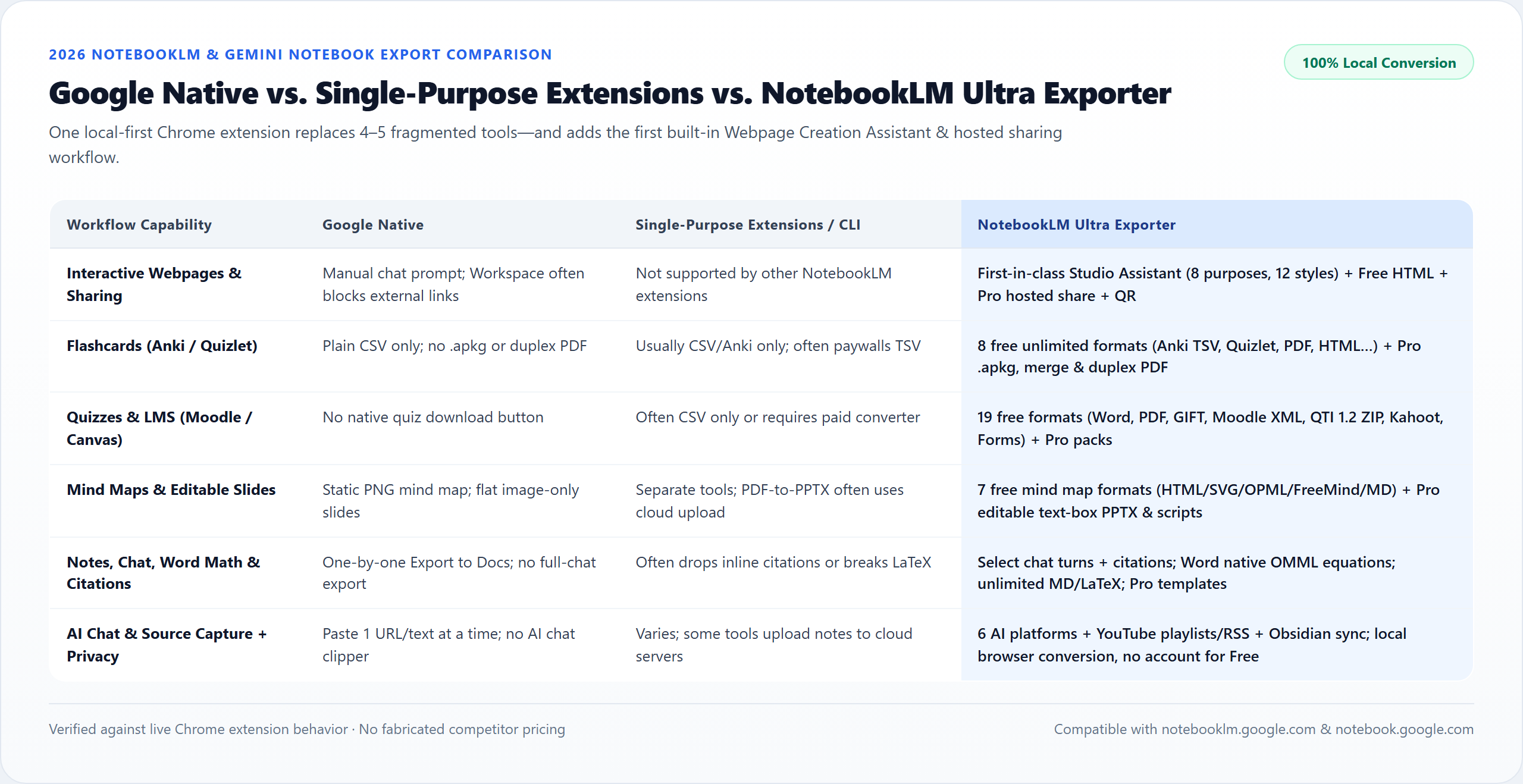
NotebookLM Ultra Exporter vs NotebookLM Tools: side by side
| Dimension | NotebookLM Ultra Exporter | NotebookLM Tools |
|---|---|---|
| Primary focus | Broad document, LMS, Anki, Slide & backup exporter + importer | Mind map export, audio overview manager, folders & prompt organiser |
| LMS quiz exports (QTI / Moodle / Forms) | 19 free single-quiz targets incl. Canvas QTI 1.2 & Moodle XML CDATA | Not designed as a full LMS quiz packager |
| Flashcards to Anki / Quizlet | 8 free formats (incl. Anki TSV, Quizlet text & Offline HTML) + Pro .apkg & duplex PDF | Limited CSV/basic export focus |
| Editable PowerPoint rebuild | Pro rebuilds native 16:9 text boxes + Speaker Notes (no OCR) | Primarily focuses on image/mind-map/note flows |
| Mind map exports (OPML / MM / SVG / PNG) | All 7 formats free (collapsed branches included) | Strong native mind-map PNG/OPML support |
| Import & sync automation | YouTube playlists, website crawl, RSS, AI chat branches, PDF split | Includes source/audio workflow helpers; check live Chrome Store listing |
| Free tier transparency | Unlimited MD/LaTeX/Mind Maps/19 Quiz formats/Anki TSV + 5/day Docs | Varies by feature gate; verify current Chrome Store tier before installing |
When to pick each option
- Choose NotebookLM Ultra Exporter if you work across Anki, Canvas/Moodle, PowerPoint, Obsidian, and multi-format research backups and want one unified extension.
- Choose NotebookLM Tools if your workflow centers mainly on organizing prompts/folders and exporting mind maps or audio files, and you already tested NotebookLM Tools on your Chrome profile.
Competitor accuracy & live verification note
- Comparison criteria above reflect features and public Chrome Web Store listings reviewed in November 2026.
- Extension developers ship updates rapidly — verify current quotas and Pro pricing on each extension’s live Chrome Web Store listing before standardizing for a team.
Plan comparison
The basics are free; the advanced options listed on this page need Ultra Exporter Pro. Pro covers the extension only; it does not include a Google subscription or raise NotebookLM / Gemini Notebook's own limits. Current prices are on the pricing page.
Comparison FAQ
NotebookLM Ultra Exporter or NotebookLM Tools: which is better for NotebookLM / Gemini Notebook?
Neither in general. Choose NotebookLM Ultra Exporter if you work across Anki, Canvas/Moodle, PowerPoint, Obsidian, and multi-format research backups and want one unified extension. Choose NotebookLM Tools if your workflow centers mainly on organizing prompts/folders and exporting mind maps or audio files, and you already tested NotebookLM Tools on your Chrome profile.
Can both extensions be installed at the same time?
Using two NotebookLM UI-injecting extensions simultaneously is not recommended because injected toolbar buttons inside Studio can overlap or compete for DOM observers. Test one at a time cleanly.
Does Ultra Exporter include folders and tags for free too?
Yes. Workspace collections, tags, pinned notebooks (up to 5), and automation rules are included free in Ultra Exporter alongside its export suite.
Verified sources & external references
- Chrome Web Store competitor capabilities audit (Nov 2026)competitor
Covers feature focus differences across NotebookLM Tools, Kortex, ExportKit, and Ultra Exporter.
- NotebookLM Ultra Exporter — Chrome Web Storeofficial
Live Chrome Web Store listing, host permissions, and version history.
- NotebookLM Help Center — Google Supportofficial
Native Google Docs/Sheets exports, Studio outputs, and 50 free / up to 600 paid source caps.
Complete workflow guide
Best NotebookLM Chrome Extensions Compared (2026): Native vs. Single-Purpose Tools vs. Ultra Exporter
Objective 2026 comparison of Google native exports, single-purpose extensions (Kortex, NotebookBloom, ExportKit, NLMTools, DeckEdit) and Ultra Exporter across webpages, Word math, PPTX, Anki, LMS quizzes, privacy & pricing.
Related guides
Kortex pairs web/chat capture with its own AI writing workspace and NotebookLM Markdown/PDF export, and ExportKit focuses on lightweight note and chat.
Chrome extensions for NotebookLM do one of three jobs. Importers add web pages, videos and files faster.
NotebookLM Ultra Exporter Free covers the basic exports without a quota, 5 Word, PDF, image PowerPoint, long image or video exports per day, 20 source.
NotebookLM and Obsidian solve opposite halves of knowledge work rather than replacing each other.
Gemini Notebook natively generates interactive sites when you type “make me a site” in chat, and some users still copy notes into Gemini Canvas and deploy.
A ZIP archive is a one-off snapshot of a NotebookLM notebook in a single file; one full archive is free.
Batch export saves several NotebookLM notes and reports as separate files in one go, zipped together.
A link source asks NotebookLM to fetch a web page itself; it keeps the URL and works for public pages.