COMPARE · APPROACHES
NotebookLM vs Obsidian: AI research assistant or long-term knowledge base?
Direct recommendation
NotebookLM and Obsidian solve opposite halves of knowledge work rather than replacing each other. NotebookLM excels at temporary, source-grounded AI synthesis across 50–600 PDFs, videos, and web pages, while Obsidian excels at permanent local-first ownership, cross-project linking, and offline search. Use NotebookLM to digest sources, then export verified Markdown notes and Obsidian-style archives into your vault with Ultra Exporter.
Best suited for
Researchers, writers, and PKM builders deciding what belongs inside Google’s NotebookLM versus a permanent local Markdown Obsidian vault
Prerequisites
- Optional Obsidian desktop vault and Ultra Exporter for clean Markdown / Vault Archive bridges
NotebookLM (Gemini Notebook) vs Obsidian: side by side
| Dimension | NotebookLM (Gemini Notebook) | Obsidian |
|---|---|---|
| Primary superpower | Source-grounded AI Q&A, quizzes, mind maps, audio & slide drafts | Permanent local Markdown ownership, [[wikilinks]], Graph & Dataview |
| Cross-project search | Scoped strictly inside one notebook at a time | Instant full-text & tag search across 10,000+ local notes |
| Offline access & portability | Requires Google cloud & active internet connection | 100% local .md files readable in any editor offline forever |
| Account lock-in risk | Tied to personal/school/work Google account lifecycle | Zero vendor lock-in; plain files on your disk or Git |
| Best bridge between both | Import Obsidian .md folders into NotebookLM as sources | Free Markdown export + 1 free Vault ZIP + Pro incremental Folder Sync |
When to pick each option
- Choose NotebookLM (Gemini Notebook) if you need to interrogate 30 dense PDFs, generate study quizzes or Audio Overviews quickly, and inspect inline passage citations.
- Choose Obsidian if you want durable personal notes you own offline, link across years of projects, and keep safely even if a university or corporate Google account closes.
Recommended two-stage PKM rhythm
- 1) Digest raw PDFs, YouTube lectures, and AI chats inside a scoped NotebookLM project notebook.
- 2) Export verified syntheses, chat citations, and mind maps into your Obsidian vault via Ultra Exporter so long-term knowledge stays searchable offline.
Plan comparison
The basics are free; the advanced options listed on this page need Ultra Exporter Pro. Pro covers the extension only; it does not include a Google subscription or raise NotebookLM / Gemini Notebook's own limits. Current prices are on the pricing page.
Comparison FAQ
NotebookLM (Gemini Notebook) or Obsidian: which is better for NotebookLM / Gemini Notebook?
Neither in general. Choose NotebookLM (Gemini Notebook) if you need to interrogate 30 dense PDFs, generate study quizzes or Audio Overviews quickly, and inspect inline passage citations. Choose Obsidian if you want durable personal notes you own offline, link across years of projects, and keep safely even if a university or corporate Google account closes.
Does Ultra Exporter sync edits made inside Obsidian back into NotebookLM automatically?
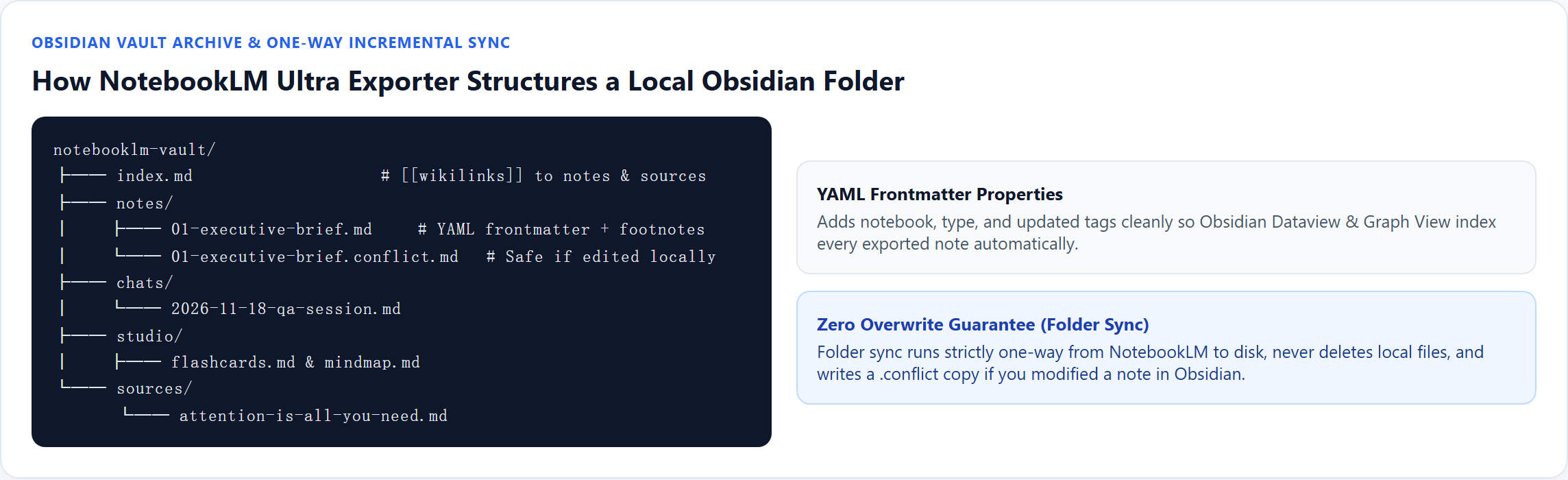
No — Folder Sync (Pro) is strictly one-way from NotebookLM to disk so it never deletes or overwrites local vault notes (creating .conflict copies if a synced note was edited locally). To send Obsidian notes into NotebookLM, use Import an Obsidian vault.
Can I move single NotebookLM notes into Obsidian without paying for Pro?
Yes — exporting individual notes, reports, chats, mind maps, and flashcards to clean Markdown is 100% free with no daily limit, plus 1 full Obsidian-style ZIP archive is free.
Verified sources & external references
- Obsidian Properties & Local-First Vaults — Obsidian Helpplatform
Explains Obsidian local Markdown files, YAML properties, and internal links.
- Combining NotebookLM with Obsidian vaults — r/ObsidianMDcommunity
Consensus PKM pattern: temporary ingestion in NotebookLM, permanent evergreen notes in Obsidian.
Complete workflow guide
How to Export & Incrementally Sync NotebookLM Notes, Chats & Mind Maps to Obsidian
Export NotebookLM / Gemini Notebook notes, cited chats, and 7 mind map formats to Obsidian free without daily caps—or run 1-way incremental vault sync with YAML frontmatter & conflict protection on Pro.
Related guides
NotebookLM has no Obsidian integration, but Obsidian reads plain Markdown files, so the route is a Markdown export.
Export a whole NotebookLM notebook to an Obsidian vault. You get Markdown files with YAML frontmatter and a wiki-link index, organized by sources, notes.
To query your Obsidian notes in NotebookLM, pick the vault folder in the NotebookLM Ultra Exporter import center.
Folder sync writes a NotebookLM notebook to a folder on your computer and keeps it current.
Gemini Notebook natively generates interactive sites when you type “make me a site” in chat, and some users still copy notes into Gemini Canvas and deploy.
A ZIP archive is a one-off snapshot of a NotebookLM notebook in a single file; one full archive is free.
Batch export saves several NotebookLM notes and reports as separate files in one go, zipped together.
A link source asks NotebookLM to fetch a web page itself; it keeps the URL and works for public pages.