COMPARE · APPROACHES
NotebookLM Ultra Exporter vs Kortex & ExportKit compared
Direct recommendation
Kortex pairs web/chat capture with its own AI writing workspace and NotebookLM Markdown/PDF export, and ExportKit focuses on lightweight note and chat downloads. NotebookLM Ultra Exporter targets users who stay in their existing tools — Word, PowerPoint, Canvas, Moodle, Anki, Zotero, Obsidian — with local in-browser conversion and deep format coverage.
Best suited for
Researchers and students weighing writing-workspace extensions (Kortex) or lightweight exporters (ExportKit) against Ultra Exporter
Prerequisites
- Desktop Chrome & active NotebookLM account
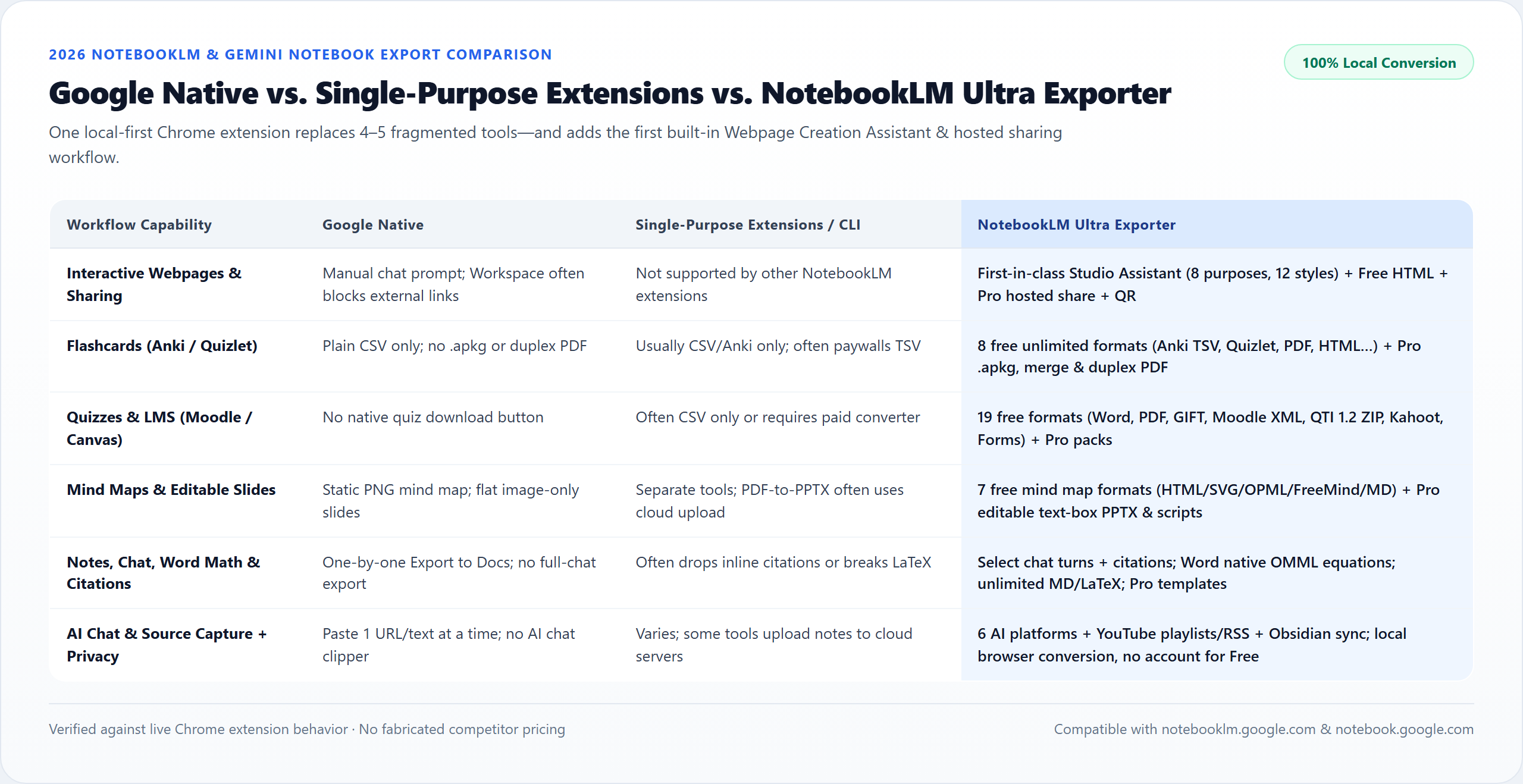
NotebookLM Ultra Exporter vs Kortex & ExportKit: side by side
| Dimension | NotebookLM Ultra Exporter | Kortex & ExportKit |
|---|---|---|
| Core positioning | Full-lifecycle NotebookLM exporter, importer & organizer | Kortex: Second-brain workspace + clipper; ExportKit: lightweight note/chat exporter |
| Conversion location | Local inside your browser DOM (Word, PPTX, QTI, ZIP built locally) | Kortex connects to Kortex workspace/sync; ExportKit is browser-based |
| Study & LMS targets | Anki TSV/.apkg, Quizlet, Canvas QTI 1.2, Moodle XML/GIFT, Kahoot, Forms | Focuses mainly on Markdown, PDF, Docs, and general notes |
| Editable PowerPoint slides | Pro 16:9 editable .pptx with Speaker Notes & reference slides | Typically not offered as native 16:9 rebuilt slide layers |
| Mind map trees | All collapsed nodes -> OPML, FreeMind, SVG, PNG, HTML, MD (free) | Varies; single-file exporters often miss collapsed branches |
| Source capture | YouTube playlists, RSS, website crawl, ChatGPT/Claude branches, PDF split | Kortex highlights strong web/social capture; ExportKit focuses on export |
When to pick each option
- Choose NotebookLM Ultra Exporter if you want direct clean exports into existing academic, LMS, Anki, PowerPoint, and Obsidian workflows without adopting a new cloud notes app.
- Choose Kortex & ExportKit if you actively write inside the Kortex editor ecosystem or only ever need basic one-click chat Markdown.
Vendor update disclaimer (November 2026)
- Third-party extensions update export limits and Pro tiers frequently. Always confirm exact free/paid limits on each Chrome Web Store listing.
- Ultra Exporter keeps 19 quiz formats, Markdown, LaTeX, Anki TSV, Mind Maps, Collections/Tags, and 20 daily imports free forever with no account signup required for free usage.
Plan comparison
The basics are free; the advanced options listed on this page need Ultra Exporter Pro. Pro covers the extension only; it does not include a Google subscription or raise NotebookLM / Gemini Notebook's own limits. Current prices are on the pricing page.
Comparison FAQ
NotebookLM Ultra Exporter or Kortex & ExportKit: which is better for NotebookLM / Gemini Notebook?
Neither in general. Choose NotebookLM Ultra Exporter if you want direct clean exports into existing academic, LMS, Anki, PowerPoint, and Obsidian workflows without adopting a new cloud notes app. Choose Kortex & ExportKit if you actively write inside the Kortex editor ecosystem or only ever need basic one-click chat Markdown.
Why does Ultra Exporter build Word, PPTX, and QTI files locally in Chrome?
Building documents inside browser memory keeps client, medical, or unpublished research files off intermediary SaaS servers while working fast on large notebooks.
Do I need to create an account just to export Markdown or Anki TSV in Ultra Exporter?
No. Free local exports (Markdown, LaTeX, Anki TSV, Mind Maps, 19 single-quiz formats, 5/day docs) run immediately after installing without requiring sign-in.
Verified sources & external references
- Chrome Web Store NotebookLM extension landscape (Nov 2026)competitor
Documents core scope boundaries between Ultra Exporter, Kortex, and lightweight single-output extensions.
- NotebookLM Ultra Exporter — Chrome Web Storeofficial
Live Chrome Web Store listing, host permissions, and version history.
- Create interactive websites in Gemini Notebook — Google Helpofficial
Documents Gemini Notebook interactive site generation ("make me a site"), native More → Download HTML flow, and native sharing constraints.
Complete workflow guide
Best NotebookLM Chrome Extensions Compared (2026): Native vs. Single-Purpose Tools vs. Ultra Exporter
Objective 2026 comparison of Google native exports, single-purpose extensions (Kortex, NotebookBloom, ExportKit, NLMTools, DeckEdit) and Ultra Exporter across webpages, Word math, PPTX, Anki, LMS quizzes, privacy & pricing.
Related guides
Both extensions add workspace organisation and export tools on top of NotebookLM. NotebookLM Tools concentrates on mind-map exports, batch audio downloads.
Chrome extensions for NotebookLM do one of three jobs. Importers add web pages, videos and files faster.
NotebookLM Ultra Exporter Free covers the basic exports without a quota, 5 Word, PDF, image PowerPoint, long image or video exports per day, 20 source.
NotebookLM and Obsidian solve opposite halves of knowledge work rather than replacing each other.
Gemini Notebook natively generates interactive sites when you type “make me a site” in chat, and some users still copy notes into Gemini Canvas and deploy.
A ZIP archive is a one-off snapshot of a NotebookLM notebook in a single file; one full archive is free.
Batch export saves several NotebookLM notes and reports as separate files in one go, zipped together.
A link source asks NotebookLM to fetch a web page itself; it keeps the URL and works for public pages.