QUESTIONS · EXPORTING
Why do NotebookLM flashcards look broken in Anki?
Direct answer
NotebookLM’s native flashcard CSV omits Anki file headers, leaves Markdown asterisks and raw $...$ math unconverted, and breaks whenever card text contains unescaped commas or gets re-saved in Excel under non-UTF-8 encoding. Exporting with Ultra Exporter’s Anki TSV or .apkg fixes all four issues automatically.
Best suited for
Students seeing jumbled columns, raw Markdown stars, broken UTF-8 symbols, or unrendered $math$ after importing NotebookLM’s native CSV into Anki
Prerequisites
- Anki 2.1.54+ / Anki 24+ (supporting #separator headers and built-in MathJax)
What to do
- Install NotebookLM Ultra Exporter in desktop Chrome, then refresh any open NotebookLM (Gemini Notebook) tab.
- Instead of clicking NotebookLM’s native Download CSV, open the deck with Ultra Exporter installed and choose Anki (.txt / TSV) (free) or .apkg (Pro).
- Verify line 1 of the
.tsvbegins with#separator:Taband#html:true— do not re-save the file inside Excel. - If you already edited a CSV in Excel, open it in LibreOffice Calc or Google Sheets and export explicitly as CSV (UTF-8) with Tab delimiter before importing into Anki.
What to know
- Symptom 1: "5 fields found on line 1, expected 2" — caused by commas inside definitions.
- Symptom 2: Literal bold or backticks on cards — caused by missing #html:true and Markdown-to-HTML conversion.
- Symptom 3: Garbled accented letters or symbols — caused by opening and re-saving CSV in Excel on Windows (ANSI/Windows-1252 instead of UTF-8).
- Symptom 4: Raw $x^2$ text instead of equations — Anki requires MathJax \(x^2\), not bare dollar signs.
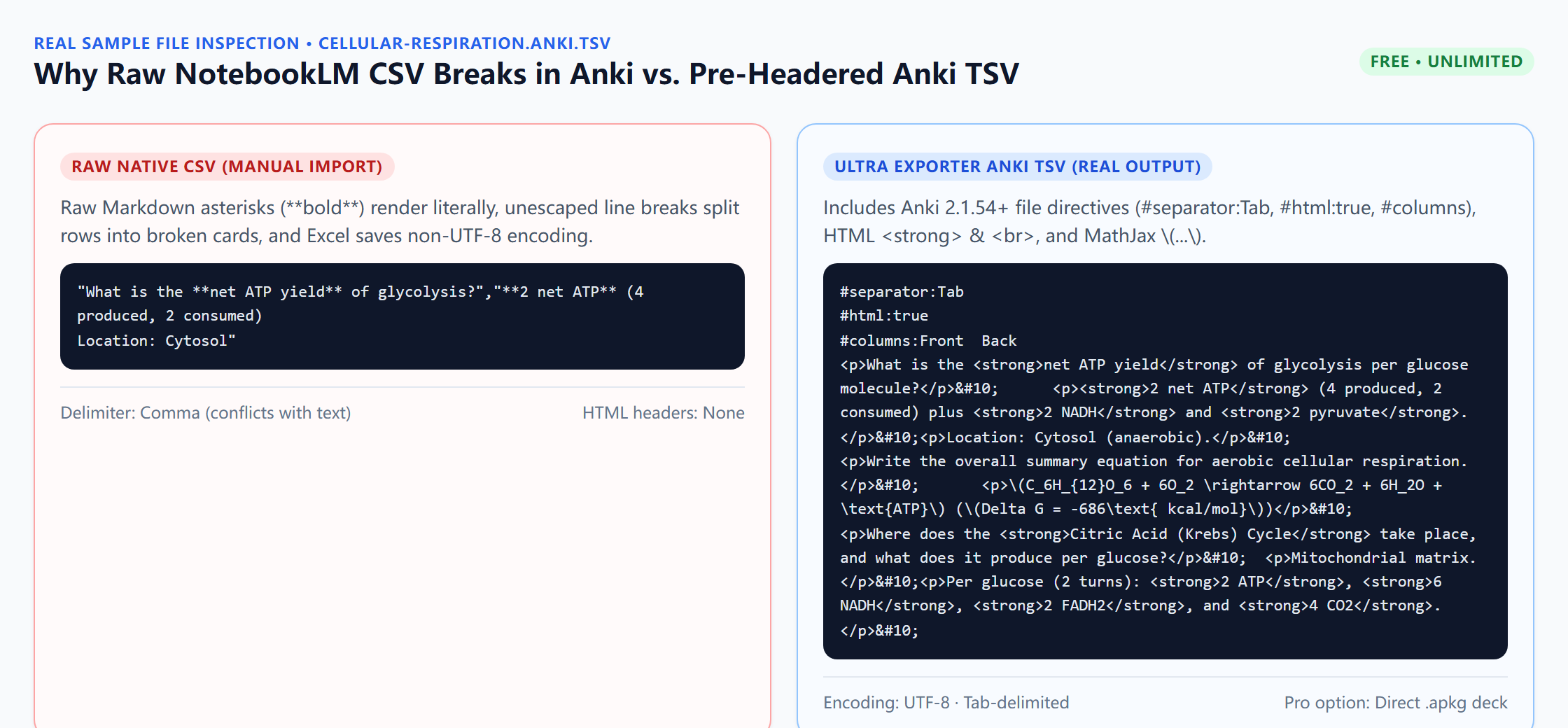
Downloadable verified test files
Google changes these menus often. The item's own menu in your notebook shows what is built in today.
Plan requirement
The basics are free; the advanced options listed on this page need Ultra Exporter Pro. Pro covers the extension only; it does not include a Google subscription or raise NotebookLM / Gemini Notebook's own limits. Current prices are on the pricing page.
Follow-up questions
Why did Anki import only half of a flashcard or warn about skipped lines?
Unquoted commas or mismatched quotes in raw CSV shift columns. Switch to tab-separated export (.anki.tsv) or binary .apkg so punctuation never collides with field separators.
Can I fix an already-downloaded NotebookLM CSV without regenerating?
Only partially: open it in Google Sheets or LibreOffice Calc, check columns, and export as UTF-8 Tab-separated text, though Markdown bolding and math delimiters must still be converted manually unless you re-export with Ultra Exporter.
Why do math equations show literal dollar signs ($...$) on my cards?
Anki disables bare dollar-sign parsing by default to avoid breaking prices. Ultra Exporter converts $...$ to \(...\) and $$...$$ to \[...\] for Anki MathJax.
Does Pro .apkg completely skip the Anki import mapper dialog?
Yes. Double-clicking the .apkg loads cards directly into a named deck without showing Anki’s text separator or column mapping screen.
Verified sources & external references
- Text Files — Anki Manualplatform
Documents #separator:Tab, #html:true headers and UTF-8 CSV pitfalls.
- Anki CSV UTF-8 Excel corruption guide — Anki Forumsplatform
Explains why Windows Excel corrupts UTF-8 characters when editing flashcard CSVs manually.
Complete workflow guide
How to Export NotebookLM Flashcards to Anki (.apkg, TSV, Quizlet & Duplex PDF)
Export NotebookLM / Gemini Notebook flashcards to pre-headered Anki TSV, Quizlet, Markdown, HTML, XLSX, CSV or PDF free without daily limits—or build .apkg decks and duplex PDFs with Pro.
Related guides
NotebookLM downloads flashcards only as CSV, which Anki does not import cleanly. With NotebookLM Ultra Exporter, open the flashcard deck, click Export and.
Both put NotebookLM flashcards into Anki. The tab-separated text file is free and imports through File, Import, where you confirm which column is the front.
Yes, NotebookLM flashcards can go into Anki. NotebookLM Ultra Exporter exports a deck as Anki-importable tab-separated text for free, with no daily quota.
NotebookLM quizzes run only in the browser and have no export. With NotebookLM Ultra Exporter, open the quiz, click Export and choose a target: Word or PDF.
Canvas rejects QTI uploads most often for three structural reasons: picking Common Cartridge instead of QTI .zip file in Course Import, unzipping and.
Open the Audio Overview in the Studio panel, open its menu and choose Download. NotebookLM saves the audio file to your computer, one overview at a time.
Open the finished Video Overview in the Studio panel and use its download option to save the video file.
For one note or report, use the built-in option in its menu to send it to Google Docs. For chats, several notes, or anything the built-in option does not.