QUESTIONS · EXPORTING
How to fix NotebookLM PPTX font substitution and unclickable slides
Direct answer
If every slide selects as a single picture, you downloaded NotebookLM’s native image-based PPTX and must rebuild editable slides with Ultra Exporter Pro first. If text is editable but headings wrap or shift when moving between Windows PowerPoint, Mac, and Google Slides, replace non-system fonts with Google Fonts or Arial and enable font embedding on save.
Best suited for
Presenters whose downloaded NotebookLM PPTX either cannot be edited or shifts fonts and wraps headings awkwardly in Google Slides or Mac PowerPoint
Prerequisites
- Either a native NotebookLM PPTX (image-only) or an editable .pptx built with Ultra Exporter Pro
- Desktop PowerPoint or Google Slides open for cleanup
What to do
- Install NotebookLM Ultra Exporter in desktop Chrome, then refresh any open NotebookLM (Gemini Notebook) tab.
- Click any headline on Slide 1: if one selection box wraps the entire slide canvas, export the deck again using Editable PowerPoint (Pro).
- In PowerPoint (Windows/Mac), open Home -> Replace (dropdown) -> Replace Fonts to swap missing custom fonts globally for Calibri, Segoe UI, or Arial.
- On Windows PowerPoint before sharing, go to File -> Options -> Save and enable Embed fonts in the file (Embed all characters).
- For Google Slides delivery, use File -> Import slides into an existing corporate Slides template rather than double-clicking the raw .pptx upload.
What to know
- Native NotebookLM PPTX files never contain text boxes, regardless of whether you open them in PowerPoint or Google Slides.
- Editable decks converted with Ultra Exporter export in 13.333 × 7.5 in widescreen (Arial default) so system font mismatches are minimized.
- When applying corporate templates, mismatched font metrics cause text overflow unless you run Replace Fonts in PowerPoint.
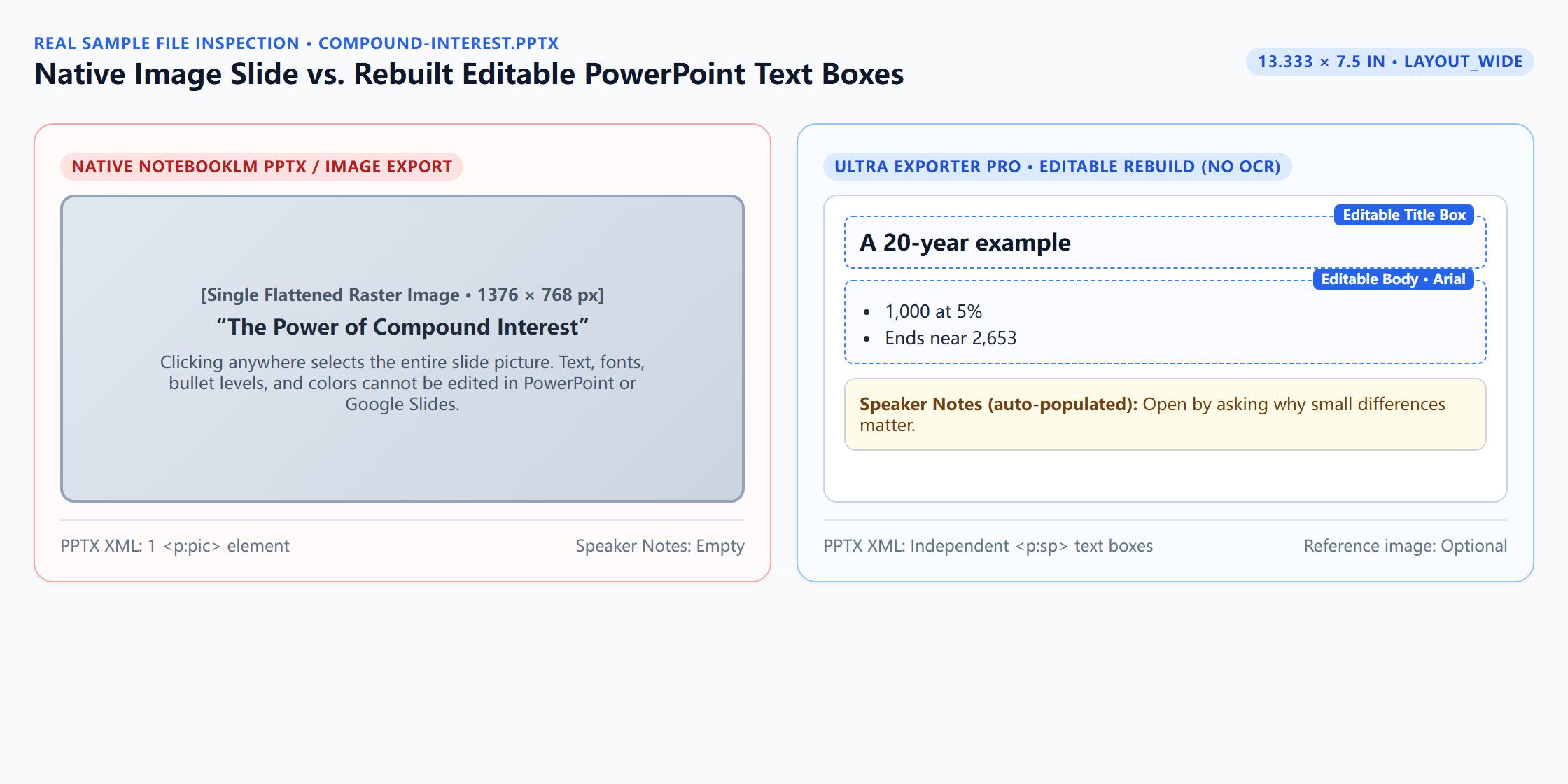
Downloadable verified test files
Google changes these menus often. The item's own menu in your notebook shows what is built in today.
Plan requirement
The basics are free; the advanced options listed on this page need Ultra Exporter Pro. Pro covers the extension only; it does not include a Google subscription or raise NotebookLM / Gemini Notebook's own limits. Current prices are on the pricing page.
Follow-up questions
Why did my NotebookLM PPTX turn into one giant image inside Google Slides?
Because Google’s built-in PPTX export puts a flattened PNG on each slide. Google Slides shows the exact file NotebookLM generated, not a conversion bug.
Which fonts survive both PowerPoint and Google Slides without reflowing?
Arial, Verdana, Georgia, Roboto, Open Sans, and Lato maintain close line metrics across Windows, macOS, and Google Slides.
My Mac colleague still sees wrong fonts after I embedded them on Windows — why?
Mac PowerPoint requires PowerPoint 2019/365 or later to read embedded fonts, and some third-party font licenses restrict embedding; Arial or Roboto avoids licensing blocks.
Can I keep the NotebookLM artwork while fixing just one typo?
No tool can cleanly rewrite raster pixels inside a flat image automatically without blurring; keep the original slide as a visual reference or crop just the illustration onto an editable slide.
Verified sources & external references
- Replace fonts in your presentation & Embed fonts — Microsoft Supportplatform
Explains why cross-OS PowerPoint files substitute fonts and how Replace Fonts / Embed fonts prevent overflow.
- Use custom fonts and import slides — Google Docs Editors Helpplatform
Google Slides supports Google Fonts natively while desktop-only PostScript fonts fall back to Arial or sans-serif.
Complete workflow guide
How to Export NotebookLM Slides to Editable PowerPoint (.pptx), Outlines & Speaker Scripts
Native NotebookLM slide exports flatten every slide into a static image. Export PNG/ZIP/image PPTX on Free, or rebuild native editable PowerPoint text boxes, outlines & speaker scripts locally with Pro.
Related guides
Because NotebookLM generates each slide as a single picture. The PDF or PPTX you download contains one flat image per slide, so there are no text boxes to.
NotebookLM slide decks export to PowerPoint in two ways with NotebookLM Ultra Exporter. The standard .pptx places each slide image on a slide and looks.
Export the NotebookLM slide deck to .pptx with NotebookLM Ultra Exporter, upload it to Google Drive and open it with Google Slides.
NotebookLM only lets you save a picture of the mind map as it is currently expanded. To get the whole map as a file, open it with NotebookLM Ultra Exporter.
NotebookLM downloads flashcards only as CSV, which Anki does not import cleanly. With NotebookLM Ultra Exporter, open the flashcard deck, click Export and.
NotebookLM’s native flashcard CSV omits Anki file headers, leaves Markdown asterisks and raw $...$ math unconverted, and breaks whenever card text contains.
NotebookLM quizzes run only in the browser and have no export. With NotebookLM Ultra Exporter, open the quiz, click Export and choose a target: Word or PDF.
Canvas rejects QTI uploads most often for three structural reasons: picking Common Cartridge instead of QTI .zip file in Course Import, unzipping and.