QUESTIONS · BACKUP AND MOVING
How do I bulk export and batch save NotebookLM notebooks?
Direct answer
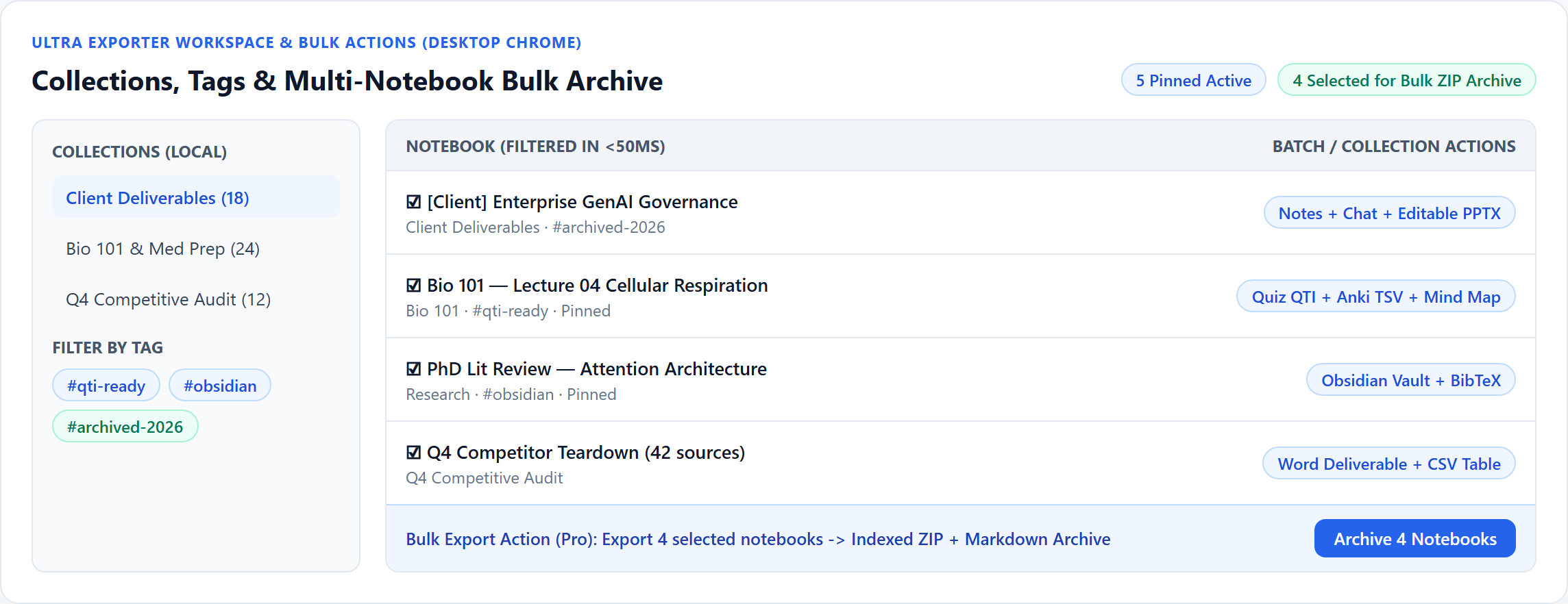
For notes inside a single notebook, Studio Batch Export handles up to 5 items per batch on Free (unlimited on Pro). To back up several notebooks at once before closing a project, open Ultra Exporter’s Workspace, select multiple notebooks, and run Multi-Notebook Bulk Archive or Folder Sync (Pro).
Best suited for
Researchers, consultants, and students needing to batch-save Studio notes before archiving a project or export multiple notebooks at once
Prerequisites
- Desktop Chrome signed into NotebookLM with Ultra Exporter installed
- Chrome "Download multiple files" allowed when prompted during batch downloads
What to do
- Install NotebookLM Ultra Exporter in desktop Chrome, then refresh any open NotebookLM (Gemini Notebook) tab.
- For one project notebook, open Studio and tick the notes/reports you need via Batch Export (or click Archive for an indexed ZIP).
- For multiple notebooks, open the Ultra Exporter Workspace, filter by collection or tag, and check the notebooks you want to save.
- Choose Bulk Archive (.zip) or Obsidian-style Folder Sync (Pro), skip Audio/Video media if you want fast text-only backups, and allow Chrome’s multiple-download prompt if asked.
What to know
- Inside one notebook: Studio Batch Export saves up to 5 selected notes/reports per run for free; Pro lifts batch and daily limits.
- Across multiple notebooks: One single-notebook full ZIP archive is free; selecting and archiving several notebooks simultaneously requires Pro.
- All bulk exports run locally in your active Chrome browser — keep the browser open until ZIP assembly finishes.
At a glance
| Bulk goal | Scope | Free tier | Pro tier |
|---|---|---|---|
| Save multiple notes/reports in one notebook | Single notebook Studio | 5 items per batch (5 docs/day for Word/PDF) | Unlimited items per batch & merged PDF/DOCX |
| Full backup of 1 notebook | Notes + chat + Studio + source text | 1 full indexed ZIP archive free | Unlimited ZIP archives + Obsidian sync |
| Export 5–100+ notebooks at once | Workspace multi-select | Archive notebooks one by one | Select multiple notebooks & batch export together |
Browser execution & media size warning
- Batch exports execute inside Chrome rather than a 24/7 cloud worker — do not close the browser window while large multi-notebook archives are packing.
- Excluding Audio/Video Overviews cuts multi-notebook backup size by 80–95% when you only need Markdown notes, chats, and citations.
Google changes these menus often. The item's own menu in your notebook shows what is built in today.
Plan requirement
The basics are free; the advanced options listed on this page need Ultra Exporter Pro. Pro covers the extension only; it does not include a Google subscription or raise NotebookLM / Gemini Notebook's own limits. Current prices are on the pricing page.
Follow-up questions
Does Free let me test batch saving notes before upgrading?
Yes. Free includes Studio Batch Export (up to 5 items per batch, unlimited Markdown/LaTeX or 5/day Word/PDF) plus 1 full-notebook indexed ZIP archive.
If I run Folder Sync (Pro) weekly, does it re-download unchanged files?
No. Folder Sync writes only added or updated items incrementally and creates .conflict files instead of overwriting notes you edited locally.
Why did Chrome stop after downloading the first file in a batch?
Chrome blocks multi-file downloads by default on first attempt. Click the blocked-download icon in the address bar and pick Always allow.
Can I batch-save notebooks while Chrome is completely closed?
No. Because Ultra Exporter runs locally in Chrome without storing your Google credentials on an external server, Chrome must remain open during export.
Verified sources & external references
- NotebookLM Help Center — Google Supportofficial
Native Google Docs/Sheets exports, Studio outputs, and source limits.
- Multi-notebook export & deletion requests — r/notebooklm communitycommunity
Users cite lack of native multi-select bulk download before end-of-semester cleanup or account switches.
Related guides
NotebookLM has no backup or full export, so the only copy of your notes, chats and Studio outputs is in your Google account.
There is no built-in way to export every notebook. With NotebookLM Ultra Exporter you archive notebooks one at a time for a single free archive, or with Pro.
Batch export lets you tick several notes, reports or Studio items in a NotebookLM notebook and export them together in one format instead of opening each.
Folder sync writes a NotebookLM notebook to a folder on your computer and keeps it current.
A NotebookLM ZIP archive captures almost everything for offline keeping — notes, reports, chats with citations, flashcards, quizzes, mind maps, extracted.
NotebookLM cannot transfer ownership of a notebook. You can share it with the other account, which leaves the original owner in control, or rebuild it there.
NotebookLM has no dependable one-click duplicate for a whole notebook with its notes and chats.
Yes. Gemini Notebook now keeps the conversation in each notebook so it is there when you return, which older versions of NotebookLM did not do.