QUESTIONS · BACKUP AND MOVING
NotebookLM backup vs. full restore: what can you actually recover?
Direct answer
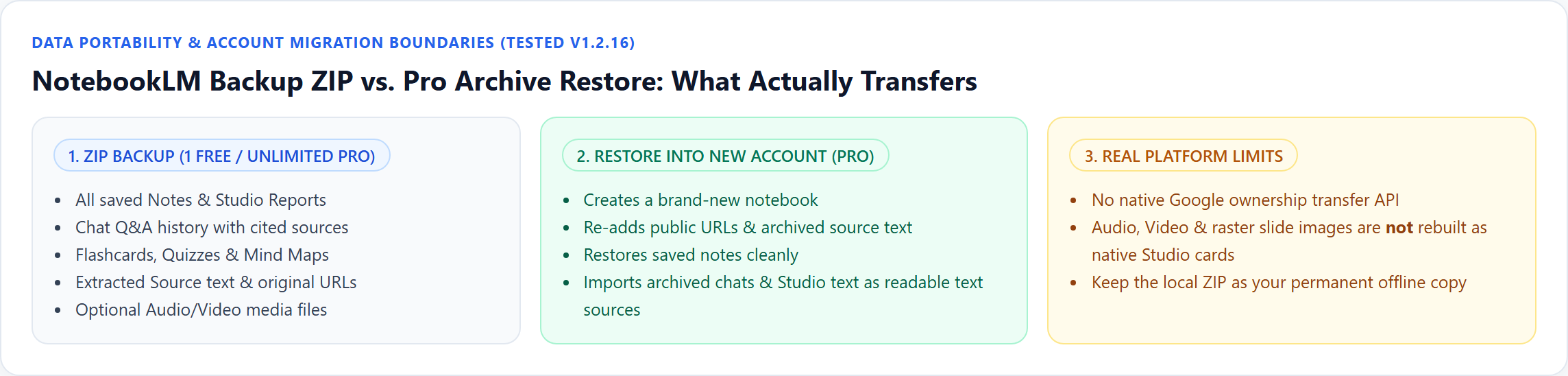
A NotebookLM ZIP archive captures almost everything for offline keeping — notes, reports, chats with citations, flashcards, quizzes, mind maps, extracted source text, and optional media. Restoring that ZIP into a new Google account (Pro) rebuilds sources and notes faithfully, but Google offers no API to recreate Audio Overviews, Video Overviews, or interactive Studio cards natively — archived chats and Studio text return as readable text sources instead.
Best suited for
Graduating students, departing employees, and researchers checking exact recovery boundaries before migrating Google accounts or deleting notebooks
Prerequisites
- Active access to your original Google account before offboarding (expired accounts cannot be read by any extension)
What to do
- Install NotebookLM Ultra Exporter in desktop Chrome, then refresh any open NotebookLM (Gemini Notebook) tab.
- While your old school or work Google account is still active, run Archive Notebook (.zip) in Ultra Exporter (1 full ZIP archive free; multi-notebook bulk archive in Pro).
- Inspect the downloaded
.ziplocally to verifynotes/,chats/,sources/, andstudio/folders are non-empty before revoking account access. - Switch Chrome to your new Google account, open Ultra Exporter Import Center -> Restore Archive (Pro), and upload the
.zipto create a fresh populated notebook.
What to know
- Backup != 1:1 native Google clone: Google provides no server-side notebook ownership transfer or Studio object import API.
- What restores natively via Pro Restore Archive: public source URLs, extracted source text, and saved Notes.
- What restores as readable text sources: archived Q&A chats and text-based Studio reports so you can immediately query your prior conclusions.
- What stays inside your local ZIP only: Audio Overviews, Video Overviews, and flattened slide/infographic images (keep the ZIP locally or in Drive).
At a glance
| Notebook item | Saved inside local ZIP backup? | Recovered via Pro Restore Archive? |
|---|---|---|
| Public Web / YouTube Source URLs | Yes (manifest + extracted text) | Yes — re-added as notebook sources |
| Uploaded PDF / Doc text | Yes (extracted source text) | Yes — restored as text sources |
| Saved Notes | Yes (Markdown + metadata) | Yes — restored as notes |
| Chat Q&A history & citations | Yes (Markdown/HTML with citations) | Imported as readable text source for querying |
| Audio / Video Overviews & Slide PNGs | Yes (when media toggle checked) | Not recreated natively — keep files from your ZIP |
Do not wait until after Google Workspace deactivation
- Once a university or employer suspends your Google account, neither Google Takeout nor Chrome extensions can read deleted notebooks. Archive at least 1–2 weeks before account offboarding.
Google changes these menus often. The item's own menu in your notebook shows what is built in today.
Plan requirement
The basics are free; the advanced options listed on this page need Ultra Exporter Pro. Pro covers the extension only; it does not include a Google subscription or raise NotebookLM / Gemini Notebook's own limits. Current prices are on the pricing page.
Follow-up questions
If I share my notebook with my personal Gmail, do I still need a backup before leaving school?
Yes! Sharing keeps ownership tied to the school account; when IT deletes that account, the shared notebook disappears for everyone. Archive and restore to own an independent copy.
Can Ultra Exporter restore my old Audio Overviews back into the new notebook’s Studio panel?
No — Google does not expose an API to inject audio files back into Studio Audio Overview cards. Keep the downloaded audio inside your local ZIP (or upload it as an audio source/private podcast).
Will source lists stay intact when switching Google accounts?
Yes — Restore Archive re-imports saved public URLs and archived text sources so you do not have to hunt down 40 links manually.
Does Google Takeout export my NotebookLM notebooks cleanly?
Google does not provide a one-click Obsidian/Markdown + Studio bundle via Takeout inside NotebookLM; local ZIP archives give immediately usable files.
Verified sources & external references
- NotebookLM Help Center — Google Supportofficial
Native Google Docs/Sheets exports, Studio outputs, and source limits.
- Migrating NotebookLM across university & corporate accounts — r/notebooklmcommunity
Documents that native notebook sharing stays tied to the original owner account and fails when the school account closes.
Complete workflow guide
How to Export & Incrementally Sync NotebookLM Notes, Chats & Mind Maps to Obsidian
Export NotebookLM / Gemini Notebook notes, cited chats, and 7 mind map formats to Obsidian free without daily caps—or run 1-way incremental vault sync with YAML frontmatter & conflict protection on Pro.
Related guides
NotebookLM has no backup or full export, so the only copy of your notes, chats and Studio outputs is in your Google account.
NotebookLM cannot transfer ownership of a notebook. You can share it with the other account, which leaves the original owner in control, or rebuild it there.
Archive restore rebuilds a NotebookLM notebook from a ZIP made by Ultra Exporter. It creates a new notebook, re-adds sources from their original links or.
Both create a new NotebookLM notebook from an existing one. A template reuses the setup, meaning tags, collection, reference sources and a starter note, for.
There is no built-in way to export every notebook. With NotebookLM Ultra Exporter you archive notebooks one at a time for a single free archive, or with Pro.
NotebookLM has no dependable one-click duplicate for a whole notebook with its notes and chats.
Yes. Gemini Notebook now keeps the conversation in each notebook so it is there when you return, which older versions of NotebookLM did not do.
Sharing a notebook requires the other person to have a Google account and open NotebookLM. To send the content itself, export it as a file: a PDF or Word.