QUESTIONS · SOURCES AND LIMITS
How to handle YouTube videos without captions in NotebookLM
Direct answer
NotebookLM requires a readable YouTube transcript to index a video link, so silent clips, music videos, or uploads with captions disabled fail inside Google’s importer. Use Ultra Exporter’s preflight list to spot failed videos without burning source slots, or import downloaded audio/clean lecture transcript text instead.
Best suited for
Students and researchers importing lectures or podcasts whose YouTube link failed inside NotebookLM due to missing or disabled captions
Prerequisites
- Target YouTube video URL checked in Ultra Exporter’s YouTube preflight list
What to do
- Install NotebookLM Ultra Exporter in desktop Chrome, then refresh any open NotebookLM (Gemini Notebook) tab.
- Paste the YouTube video or playlist link into Ultra Exporter’s YouTube Importer.
- Review preflight status indicators: import captioned lectures first (Free: 5/batch, 20/day; Pro: unlimited).
- For a skipped clip with zero captions, download or transcribe the spoken track externally, then upload the audio or
.txt/.mdtranscript directly as a local file source.
What to know
- Ultra Exporter does not fake AI audio transcription for arbitrary blocked YouTube URLs — if YouTube returns zero captions, Google’s URL importer rejects that item.
- Videos you own or already transcribed locally can be uploaded directly to NotebookLM as
.mp3/.wavaudio files or pasted Markdown transcripts. - Checking playlists via Ultra Exporter preflight prevents dead links from stalling bulk course imports.
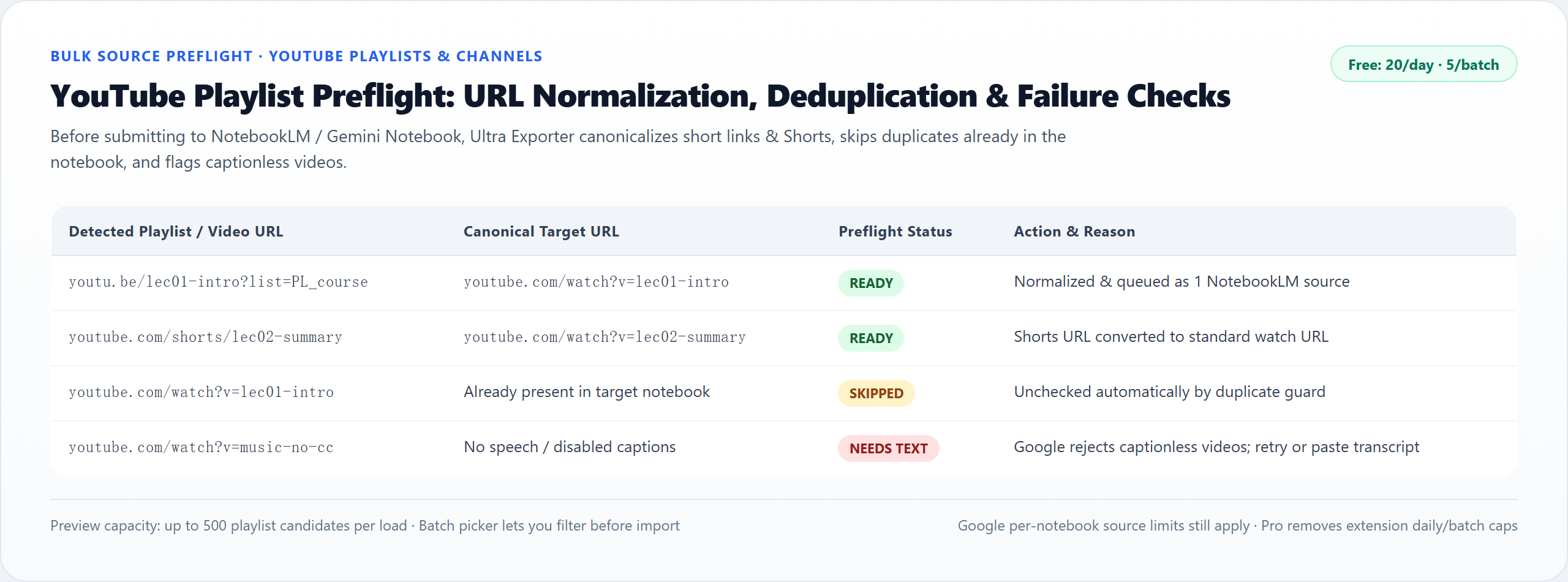
Other common reasons YouTube URLs fail in NotebookLM
- Private, age-restricted, or members-only YouTube course videos cannot be fetched anonymously by Google’s URL crawler.
- Very new livestreams often take hours for YouTube’s auto-captions to finish processing before NotebookLM accepts the link.
Google changes these menus often. The item's own menu in your notebook shows what is built in today.
Plan requirement
The basics are free; the advanced options listed on this page need Ultra Exporter Pro. Pro covers the extension only; it does not include a Google subscription or raise NotebookLM / Gemini Notebook's own limits. Current prices are on the pricing page.
Follow-up questions
Why did NotebookLM accept 9 videos from a playlist and reject the 10th?
Either that 10th upload disabled auto-captions, was unlisted/members-only restricted, or is still waiting on YouTube transcript indexing.
Does importing a skipped audio file count toward my 50/600 notebook source limit?
Yes — every transcript file or uploaded audio source counts as 1 source within NotebookLM’s limit (up to 500,000 words / 200 MB per file).
Can Ultra Exporter translate or transcribe a YouTube video inside Chrome automatically?
No. Google’s NotebookLM server parses YouTube captions or uploaded audio files directly; Ultra Exporter automates preflight selection and playlist batching.
How do I catch newly uploaded videos from a weekly lecture channel?
Save the channel or playlist as an import recipe; Pro checks on a schedule while Chrome stays open and imports only unadded uploads.
Verified sources & external references
- NotebookLM Help Center & Source Limits — Google Supportofficial
Covers 50 free / up to 600 paid source limits, 500k words / 200 MB per source, and flat notebook homepage behavior.
Related guides
NotebookLM takes YouTube videos one link at a time and does not expand a playlist. Paste the playlist URL into the YouTube import of NotebookLM Ultra.
NotebookLM adds YouTube videos one link at a time. NotebookLM Ultra Exporter collects the videos of a playlist into a preview (up to 50 videos per pass) and.
To study a whole channel, paste the channel URL into the YouTube import of NotebookLM Ultra Exporter.
Open Ultra Exporter’s Open Tabs importer in desktop Chrome to list every open tab in the current window, uncheck duplicates or dashboards, and send selected.
Google documents a limit of 50 sources per notebook on the free tier, with each source limited to 500,000 words or 200 MB.
You cannot raise the limit, but you can fit more into it. Merge related sources into one text source, combine small text files before importing, and split.
NotebookLM accepts website links through its add-source dialog, a few at a time. To import a long list, paste the URLs, one per line or mixed into text, into.
NotebookLM fetches links from Google servers, not from your browser. A page fails when it needs a login, sits behind a paywall, blocks automated requests, or.